To block AI crawlers with robots.txt, add a User-agent group for each bot's token, such as GPTBot or ClaudeBot, followed by Disallow: /. The harder question is which bots to block. Training crawlers, AI search crawlers and user-triggered fetchers do different jobs, and blocking the wrong one removes you from AI answers.
Key Takeaways
- AI bots fall into three groups: training crawlers, search and retrieval crawlers, and fetchers triggered by a user's request. Decide per group, not per company.
- Blocking a search crawler such as OAI-SearchBot or PerplexityBot takes you out of that engine's answers. Blocking a training crawler such as GPTBot does not.
- Google-Extended controls Gemini training and grounding, not Google Search. To leave AI Overviews and AI Mode while staying in Search, Google now offers a Search Console control, rolled out worldwide by August 31, 2026.
- Cloudflare changed its defaults on September 15, 2026 for new sites and unchanged free plans. Check your CDN before you assume your robots.txt is the policy in force.
- robots.txt is a request, not a lock. Enforce at the CDN for bots that ignore it, and use a login for anything private.
- Ahrefs found that 97% of llms.txt files got zero requests in May 2026. Publish one if it is cheap, but do not count on it.
This guide is for marketing leaders, founders and the developers who keep their sites running. Cyberdunes runs GEO and page speed services for brands that want to be cited by AI engines, and we set our own AI crawler policy in our robots.txt on October 17, 2026. Every user-agent token below was checked against the vendor's own documentation in October 2026.
What Are the Three Kinds of AI Crawlers?
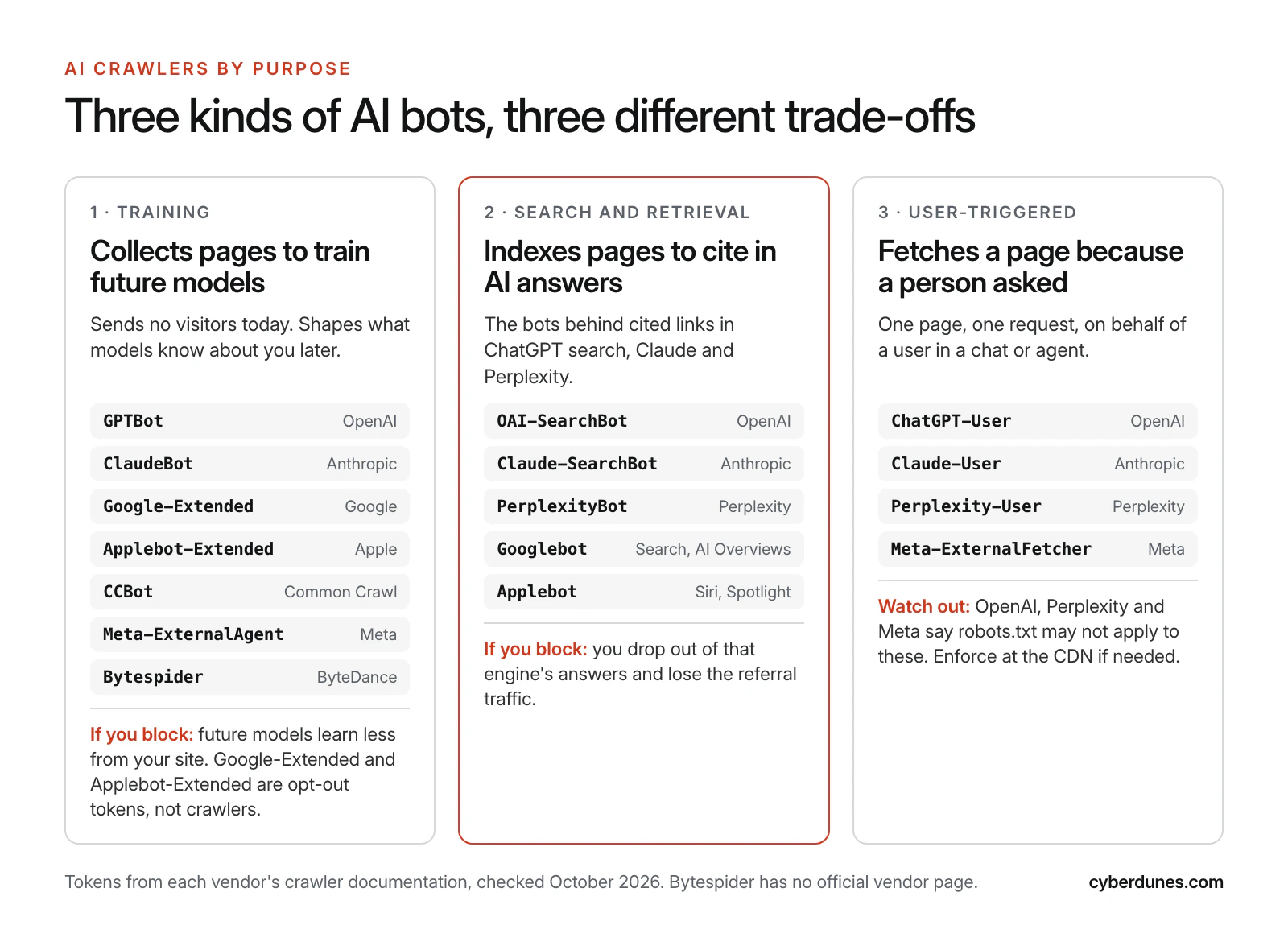
AI crawlers are bots run by AI companies, and they fall into three groups by purpose: training, search and retrieval, and user-triggered fetching. The group, not the company name, tells you what you gain or lose by blocking it.
- Training crawlers collect pages that may be used to train future models. OpenAI says GPTBot crawls content that "may be used in training our generative AI foundation models" (OpenAI). They send no visitors today.
- Search and retrieval crawlers build the index an AI engine searches when it writes an answer with citations. OpenAI states that sites opted out of OAI-SearchBot "will not be shown in ChatGPT search answers" (OpenAI).
- User-triggered fetchers load a single page because a person asked the assistant to. OpenAI notes that for ChatGPT-User, "robots.txt rules may not apply" because a user started the action.
The split matters because traffic flows differently. Cloudflare found that training accounted for nearly 80% of AI bot crawling in mid-2025, and that in the first week of August 2025 Anthropic crawled nearly 50,000 pages for each referral it sent, OpenAI 887 and Perplexity 118 (Cloudflare, August 2025). Cloudflare notes that referrals from native apps may be undercounted, so treat the ratios as directional. The pattern still holds: training takes, search gives something back.
Which AI Bots Should You Allow or Block?
For most brands, allow every documented search crawler and user-triggered fetcher, decide on training crawlers deliberately, and block bots with no public documentation. The table lists each token as its operator documents it, with our default for a brand that wants AI visibility.
| Token | Operator | Purpose | What the vendor says about robots.txt | Brand default |
|---|---|---|---|---|
| GPTBot | OpenAI | Training | Disallowing it signals content should not be used for training | Allow |
| OAI-SearchBot | OpenAI | ChatGPT search | Opted-out sites are not shown in ChatGPT search answers | Allow |
| ChatGPT-User | OpenAI | User actions in ChatGPT and Custom GPTs | Rules may not apply | Allow |
| Googlebot | Google Search, including AI Overviews and AI Mode | Blocking it removes you from Search | Allow | |
| Google-Extended | Gemini training and grounding (a token, not a crawler) | No effect on Search inclusion or ranking | Allow | |
| ClaudeBot | Anthropic | Training | Honored; excludes future content from training | Allow |
| Claude-SearchBot | Anthropic | Search indexing | Blocking prevents indexing for search | Allow |
| Claude-User | Anthropic | Fetches for user questions | Blocking prevents retrieval for user queries | Allow |
| PerplexityBot | Perplexity | Search results; not used for foundation model training | Perplexity recommends allowing it | Allow |
| Perplexity-User | Perplexity | User actions | Generally ignores robots.txt | Allow |
| Applebot-Extended | Apple | Apple model training (a token, not a crawler) | Search results unaffected | Allow |
| CCBot | Common Crawl | Open web archive used widely for research and AI | Disallow to block | Allow |
| Meta-ExternalAgent | Meta | Training AI models or indexing content | Disallow to block | Allow |
| Meta-ExternalFetcher | Meta | Fetches links at a user's request | May bypass robots.txt | Allow |
| Bytespider | ByteDance | Not documented | No vendor page we could find | Block at CDN |
Sources for each row: OpenAI crawlers, Google common crawlers, Anthropic, Perplexity crawlers, About Applebot, Common Crawl CCBot and Meta web crawlers. OpenAI says changes take about 24 hours to reach its search systems, and Perplexity says up to 24 hours.
Why allow training crawlers if you are a brand? Training data shapes what a model "knows" about your category before it searches. If your product pages and guides are absent, the model leans on reviews, competitors and old press. We explain how engines pick sources in How Do LLMs Choose Sources to Cite?
How Does Google-Extended Relate to Googlebot and AI Overviews?
Google-Extended does not control AI Overviews. It controls whether Google can use your content to train Gemini models and to ground answers in Gemini Apps and Vertex AI, and Google states that it "does not impact a site's inclusion in Google Search nor is it used as a ranking signal" (Google).
AI Overviews and AI Mode are part of Google Search, which Googlebot crawls. Blocking Googlebot to escape AI Overviews would remove you from Search entirely. Until 2026 the only finer controls were snippet rules such as nosnippet, which also trim your regular listing.
That changed on June 3, 2026. Google announced a Search Console toggle that lets a site decide whether it appears in, and helps ground, AI Overviews, AI Mode and AI Overviews in Discover. Google says opted-out sites "will not receive traffic or impressions from our generative AI features," and that the control is not a ranking signal for regular results. Google's note says the control reached all websites worldwide as of August 31, 2026 (Google, June 2026).
For most brands the right setting is to stay in. AI Overviews and AI Mode are where many buyers now meet your category. If you want more of those citations, start with our guide to getting into Google AI Mode answers.
What Changed With Cloudflare's AI Crawler Defaults?
If your site sits behind Cloudflare, your CDN settings may be blocking AI bots that your robots.txt allows. Check the dashboard before you edit anything else.
- July 1, 2025. Cloudflare began to "block AI crawlers accessing content without permission or compensation, by default," and asked every new domain whether to allow AI crawlers. It said more than one million customers had already turned on its one-click AI bot block (Cloudflare).
- Pay per crawl. Launched in private beta the same day. A site sets a price, and AI crawlers receive an HTTP 402 Payment Required response with the price, then choose to pay or leave. Owners can allow, charge or block each crawler (Cloudflare).
- July 1, 2026. Cloudflare split AI access into search, agent and training controls, and turned pay per crawl into pay per use, which pays publishers when their content appears in AI answers. Launch partners are Ceramic.ai and You.com (Cloudflare).
- September 15, 2026. New customers, new sites and free customers who have not changed their settings get defaults that "allow for search but block training and agent use for pages with ads." Mixed crawlers that do not offer separate choices are blocked on all pages with ads (Cloudflare).
Two practical points. First, if you are on the free plan and never touched these settings, your defaults changed on September 15 for pages that carry ads. Second, "agent use" covers some user-triggered fetchers. If you want AI assistants to read your pages on a buyer's behalf, allow agent use explicitly. Our guide to designing sites AI agents can use covers the rest of that work.
How Do You Decide: Allow, Block or Charge?
Decide with three questions: how you make money from a visit, whether AI answers can substitute for your content, and whether you have the bargaining power to be paid. Most brands should allow almost everything. Publishers and SaaS companies need more nuance.
- Does your revenue come from what the visitor does after reading, or from the reading itself? A brand, retailer or service firm earns money when someone buys, books or calls. An AI answer that names you helps. A publisher earns from ads and subscriptions on the page, so an answer that replaces the visit costs money.
- Can an AI answer substitute for your page? Recipes, news summaries and reference data are easy to substitute. A product page, a booking engine or a software trial is not.
- Do you have the bargaining power to charge? Pay per crawl and licensing deals suit sites with unique, frequently updated content in demand. A small brand that blocks training crawlers to get paid will mostly get ignored.
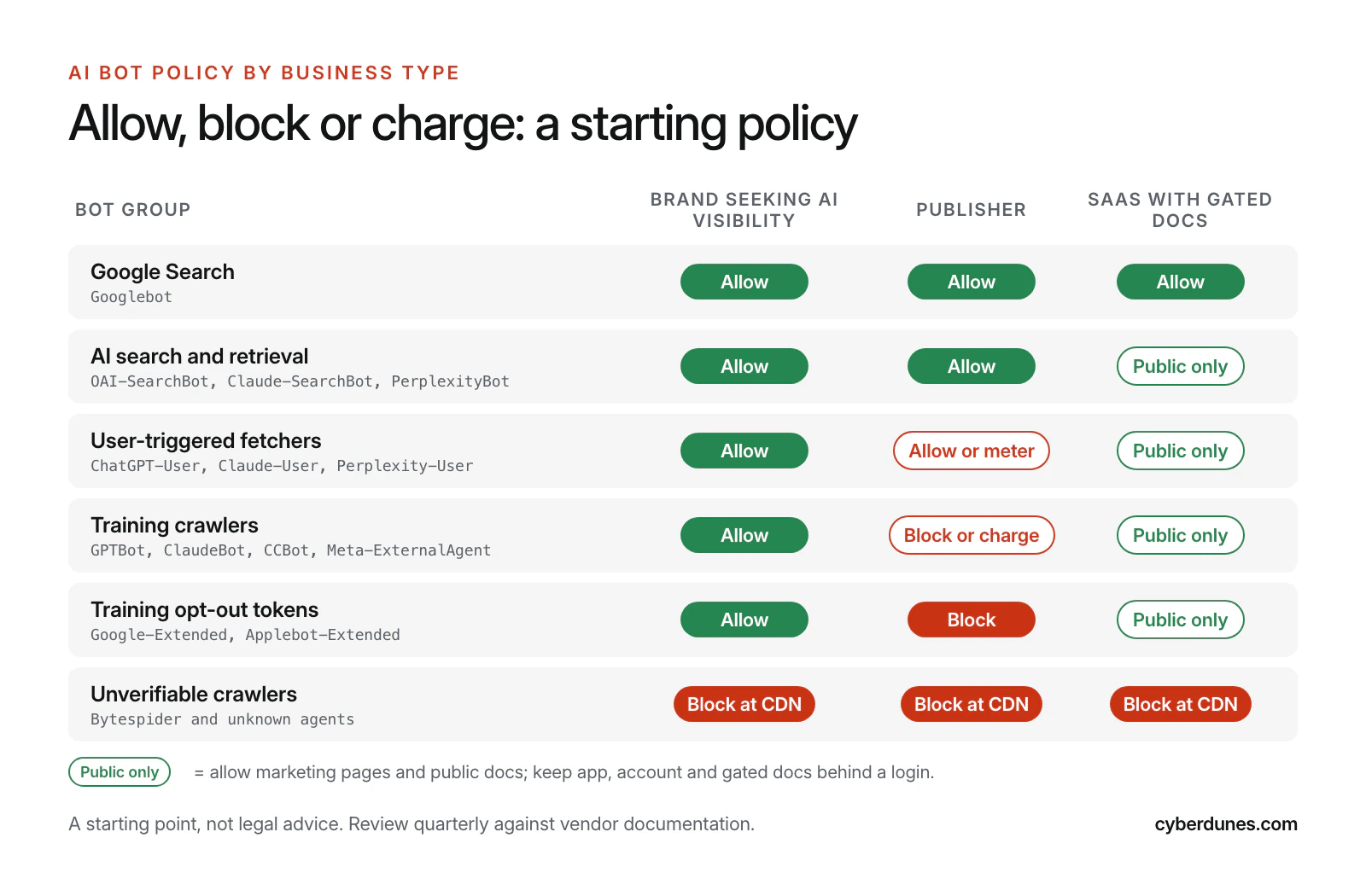
We recommend writing the decision down with an owner and a review date. That is what we did: the comment at the top of our own robots.txt records that all three AI categories were deliberately allowed on October 17, 2026, and asks for a quarterly review against vendor documentation.
Copy-Paste robots.txt Policies for Three Business Types
Each policy below lists named bots in groups and repeats the private paths in every group. Replace the example paths and sitemap URL with your own, then test before you publish.
The repetition is deliberate. Under RFC 9309, a crawler obeys the group that names it and only falls back to the User-agent: * group "if no matching group exists" (Rfc 9309). A GPTBot group with only Allow: / lets GPTBot into your cart and account pages, even if the * group blocks them. This is the most common mistake we see in AI bot policies.
Policy A: A Brand That Wants AI Visibility
Allow search, user-triggered and training bots; keep thin and private paths out; ask Bytespider to stay away and enforce that at the CDN.
# Policy A: brand that wants AI visibility
# Search engines, AI search, user-triggered fetchers and training crawlers
User-agent: Googlebot
User-agent: Bingbot
User-agent: Applebot
User-agent: OAI-SearchBot
User-agent: ChatGPT-User
User-agent: Claude-SearchBot
User-agent: Claude-User
User-agent: PerplexityBot
User-agent: Perplexity-User
User-agent: GPTBot
User-agent: ClaudeBot
User-agent: Google-Extended
User-agent: Applebot-Extended
User-agent: CCBot
User-agent: Meta-ExternalAgent
Disallow: /cart/
Disallow: /account/
Disallow: /search/
Allow: /

# No public vendor documentation: ask it to stay out, then enforce at the CDN
User-agent: Bytespider
Disallow: /

# Everyone else
User-agent: *
Disallow: /cart/
Disallow: /account/
Disallow: /search/

Sitemap: https://www.example.com/sitemap.xml
Policy B: A Publisher
Stay in search and AI answers, which still send readers, and refuse training. Blocking Google-Extended also stops Gemini Apps from grounding answers in your pages, and does not touch Google Search. To leave AI Overviews too, use the Search Console control, not robots.txt. Consider pay per crawl or pay per use if your content is unique.
# Policy B: publisher
# Stay in search and AI answers; refuse model training
User-agent: Googlebot
User-agent: Bingbot
User-agent: Applebot
User-agent: OAI-SearchBot
User-agent: Claude-SearchBot
User-agent: PerplexityBot
User-agent: ChatGPT-User
User-agent: Claude-User
User-agent: Perplexity-User
Disallow: /account/
Allow: /

# Training crawlers and training opt-out tokens
User-agent: GPTBot
User-agent: ClaudeBot
User-agent: Google-Extended
User-agent: Applebot-Extended
User-agent: CCBot
User-agent: Meta-ExternalAgent
User-agent: Bytespider
Disallow: /

# Everyone else
User-agent: *
Disallow: /account/

Sitemap: https://www.example.com/sitemap.xml
Policy C: A SaaS Company With Gated Docs
Open the marketing site and public documentation to every documented bot. Developers increasingly ask assistants how to use a product, and answers drawn from your own docs are more accurate than answers drawn from forum threads. Customer-only documentation belongs behind a login.
# Policy C: SaaS with gated documentation
# Marketing site and public docs open to every named bot.
# The app, API and customer docs sit behind a login, not just this file.
User-agent: Googlebot
User-agent: Bingbot
User-agent: Applebot
User-agent: OAI-SearchBot
User-agent: ChatGPT-User
User-agent: Claude-SearchBot
User-agent: Claude-User
User-agent: PerplexityBot
User-agent: Perplexity-User
User-agent: GPTBot
User-agent: ClaudeBot
User-agent: Google-Extended
User-agent: Applebot-Extended
User-agent: CCBot
User-agent: Meta-ExternalAgent
Disallow: /app/
Disallow: /api/
Disallow: /account/
Allow: /

User-agent: Bytespider
Disallow: /

# Everyone else
User-agent: *
Disallow: /app/
Disallow: /api/
Disallow: /account/

Sitemap: https://www.example.com/sitemap.xml
Never list secret paths in robots.txt. The file is public, so a line such as Disallow: /internal-pricing/ advertises the page to anyone who reads it. Protect those pages with authentication and leave them out of the file.
What Can't robots.txt Do?
robots.txt cannot stop a bot that chooses to ignore it. The standard says plainly: "These rules are not a form of access authorization" (RFC 9309, September 2022).
- Compliance is selective. A study of 130 self-declared bots over 40 days found bots were less likely to comply with stricter directives, and that some categories, including AI search crawlers, rarely check robots.txt at all (Kim et al., arXiv, 2025).
- User-triggered fetchers are exempt by design. OpenAI says robots.txt rules may not apply to ChatGPT-User. Perplexity says Perplexity-User "generally ignores robots.txt rules," and Meta says Meta-ExternalFetcher "may bypass robots.txt rules."
- Names can be faked. Common Crawl warns that some crawlers falsely claim to be CCBot and suggests reverse DNS checks (Common Crawl). Perplexity publishes IP lists for its bots so you can verify them in firewall rules (Perplexity).
- It is not retroactive. Blocking a training crawler today affects future crawls. Anthropic, for example, says a block signals that "future materials" should be excluded (Anthropic).
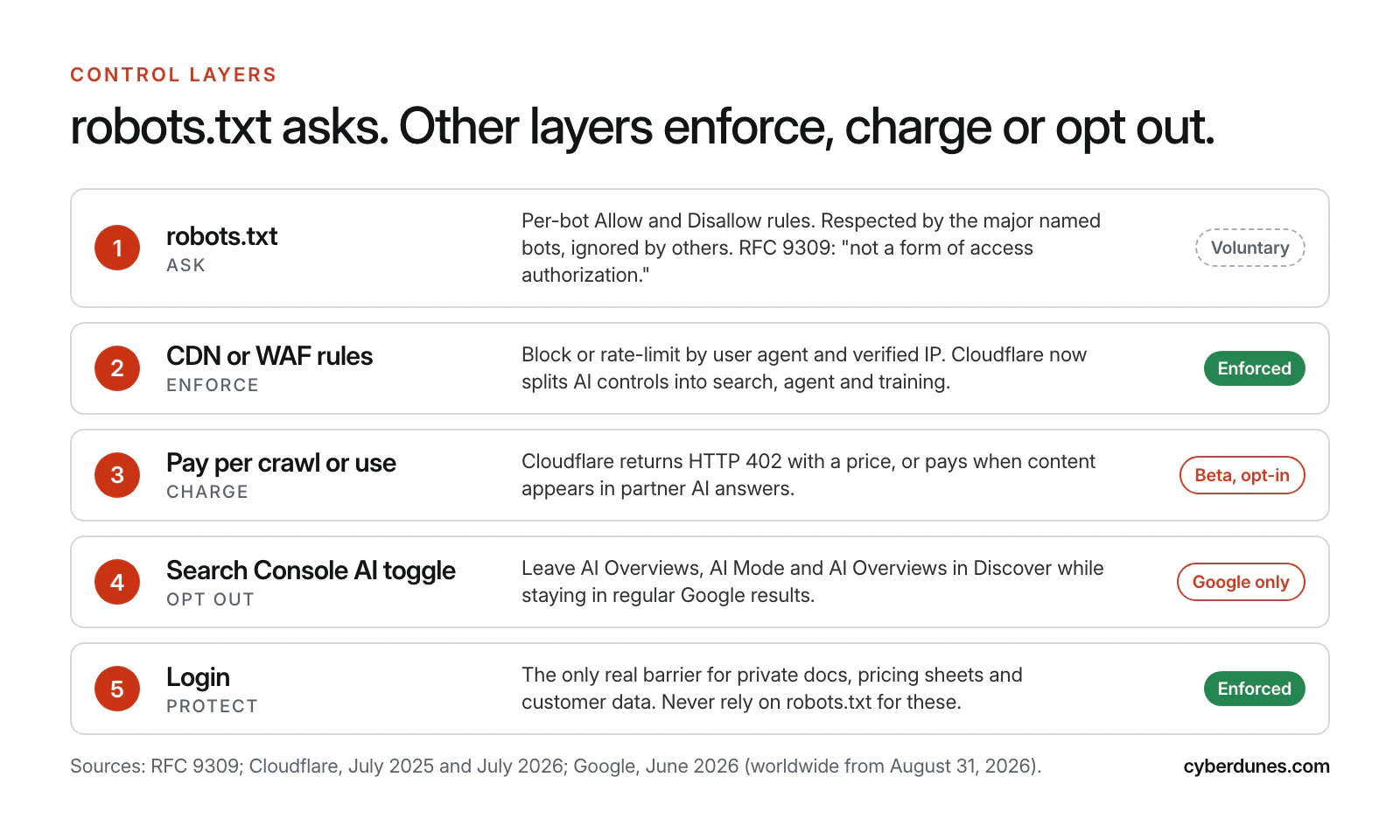
A sound setup uses robots.txt to state the policy, CDN or firewall rules to enforce it for bots that misbehave, and authentication for anything private. Our website security checklist covers the firewall basics.
Does llms.txt Help? What the Evidence Says
llms.txt is a Markdown file at your site root that points language models to your most important pages. It is a community proposal, not a standard, and current evidence shows AI bots rarely request it.
Ahrefs studied 137,210 domains in its web analytics product. In June 2026 it reported that 28% of them publish an llms.txt file, and that 97% of those files received zero requests in May 2026. Among the few files that were fetched, about 19.5% of requests came from named AI tools, led by GPTBot (Ahrefs, June 2026). Ahrefs treats its numbers as a ceiling: its customers skew technical, and a fetch is not proof that a model used the file.
Our view: llms.txt costs little to publish and maintain if your platform generates it, so keep one, but spend your effort on crawlable pages, clear answers and structured data. Our support guide explains how to set up llms.txt, IndexNow and Schema, and the GEO checklist lists the work that moves citations.
How Do You Roll Out an AI Crawler Policy?
Treat the policy as a small project with an owner, a test and a review date. Most teams can finish in two weeks.
- Audit what is already in force (day 1 to 2, developer). Read your live robots.txt, your CDN bot settings and any WordPress or SEO plugin rules. On WordPress, check both your SEO plugin's robots.txt editor and whether a physical robots.txt file sits in the site root, because the two can disagree.
- Check your logs (day 2 to 4, developer). List which AI user agents hit the site in the last 30 days, which pages they fetch and whether any blocked bot still arrives.
- Decide per group (day 5, marketing lead with legal for publishers). Use the matrix above. Write down the reasons.
- Write and test the file (day 6 to 7, developer). Start from the template, repeat private paths in each group and validate the syntax before deploying.
- Align the CDN (day 8, developer). Make Cloudflare or your WAF match the policy, and add hard blocks for bots you refuse.
- Measure (week 2 onward, marketing). Track AI referral visits and citations. Our guide to tracking AI traffic in GA4 shows the setup, and an AI visibility checker shows whether engines cite you.
- Review quarterly (owner named in the file). Vendors add and rename bots. Recheck each vendor page against your file.
How Cyberdunes and Apex® Help
Apex®, the AI-native digital experience platform (DXP) we build, publishes your XML sitemaps, Schema.org JSON-LD and llms.txt, pings IndexNow when pages change, and tracks prompts, citations and sentiment across ChatGPT, Gemini, Claude, Perplexity and Google AI Overviews. That lets you see whether a robots.txt or CDN change moved your AI visibility, instead of guessing.
If you want a second pair of eyes on your policy, our GEO services team reviews robots.txt, CDN rules and crawl logs, and maps the pages AI engines should read first. No setting can guarantee a citation, but the wrong setting can guarantee you never get one.
Book an AI crawler policy review
Sources
- Overview of OpenAI Crawlers (OpenAI, accessed October 2026)
- Google's Common Crawlers, Google-Extended (Google Search Central, accessed October 2026)
- New Opportunities, Control and Insights for Website Owners (Google, June 2026, updated August 2026)
- Does Anthropic Crawl Data From the Web? (Anthropic, accessed October 2026)
- Perplexity Crawlers (Perplexity, accessed October 2026)
- About Applebot (Apple, accessed October 2026)
- CCBot (Common Crawl, accessed October 2026)
- Meta Web Crawlers (Meta for Developers, accessed October 2026)
- Cloudflare Just Changed How AI Crawlers Scrape the Internet-at-Large (Cloudflare, July 2025)
- Introducing Pay Per Crawl (Cloudflare, July 2025)
- Your Content, Your Rules (Cloudflare press release, July 2026)
- A Deeper Look at AI Crawlers: Traffic by Purpose and Industry (Cloudflare, August 2025)
- RFC 9309: Robots Exclusion Protocol (IETF, September 2022)
- Scrapers Selectively Respect robots.txt Directives (Kim et al., arXiv, May 2025, revised October 2025)
- We Analyzed 137K Sites: 97% of llms.txt Files Never Get Read (Ahrefs, June 2026)