To track AI traffic in GA4, use the built-in AI Assistant channel Google added in May 2026, then add a custom channel group with a source regex. That catches ChatGPT, Gemini, Claude, Perplexity and Copilot visits the default rules miss. Clicks from Google AI Overviews and AI Mode still count as Organic Search.
Key Takeaways
- Since May 13, 2026, GA4 gives visits from recognized AI assistants the medium "ai-assistant" and groups them in a new AI Assistant channel. You do not have to set anything up.
- The built-in channel only works when the assistant passes a referrer. A tagged link with no referrer, such as
utm_source=chatgpt.comon its own, ends up in Unassigned. - A custom channel group with one regex on session source catches both cases. Google applies it to your past data too, so you can compare this year with last year.
- Google files clicks from AI Overviews and AI Mode under Organic Search. Search Console's generative AI report shows impressions for those features, not clicks.
- GA4 only counts visits. Mentions with no click, assistant fetches and visits with stripped referrers need server logs and AI visibility tracking.
This guide is for marketing leaders and analysts who need a number for AI traffic they can defend in a board review. Our SEO and GEO team sets up GA4 and Search Console for Cyberdunes clients, and we build AI visibility tracking into Apex®, the AI-native digital experience platform (DXP). Every rule below comes from Google's documentation as it stood in October 2026.
What Counts as AI Traffic in GA4?
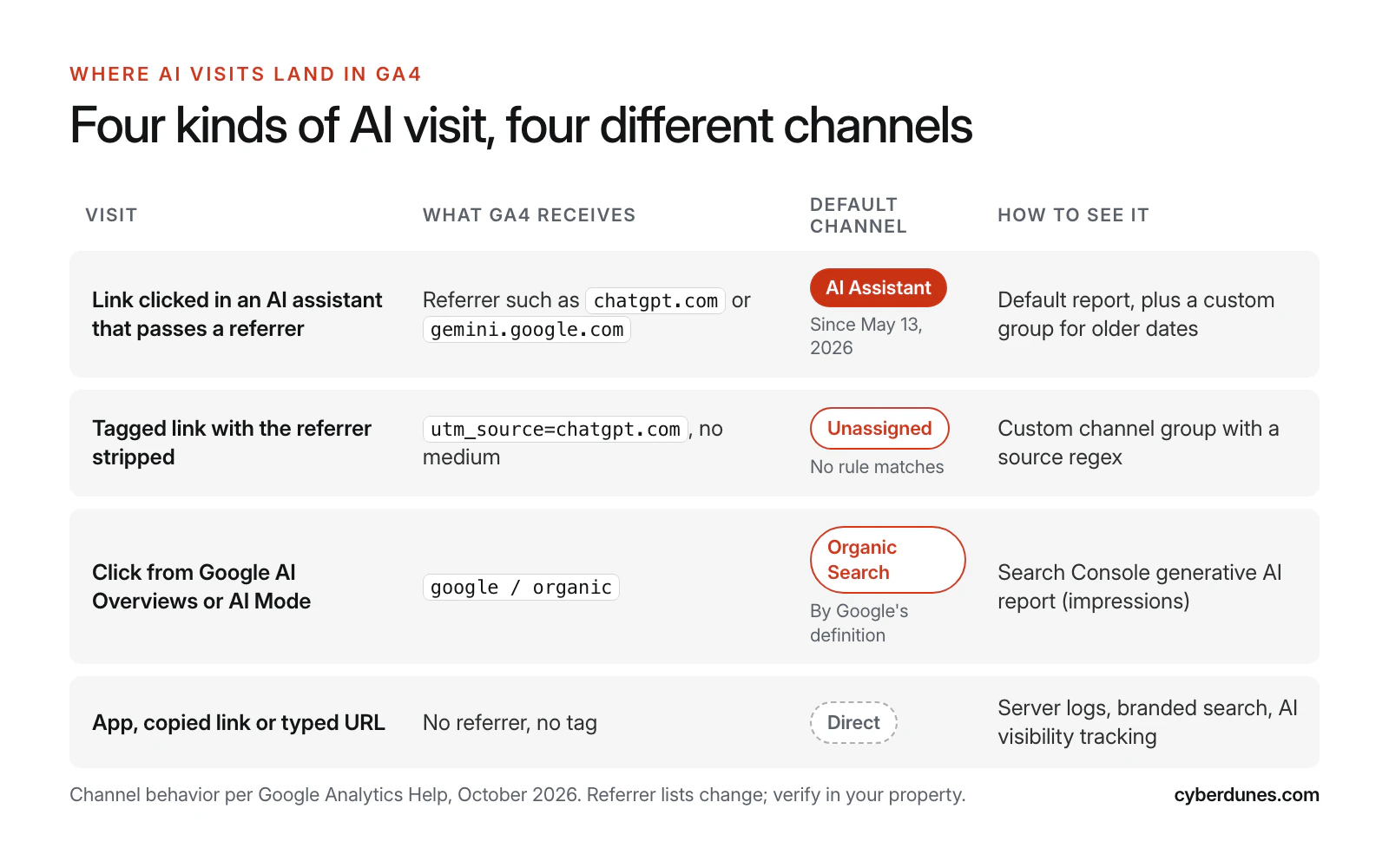
AI traffic in GA4 means sessions that started from an answer in an AI assistant or an AI search feature. It comes in four kinds, and GA4 files each one in a different place.
- Assistant referrals with a referrer. A buyer clicks a link in ChatGPT, Gemini, Claude, Perplexity or Copilot, and the browser passes the assistant's domain.
- Tagged links without a referrer. The link carries a UTM tag, but the referrer is stripped on the way.
- Google AI features. A click from an AI Overview or from AI Mode on Google Search.
- Dark AI traffic. The buyer opens a link in an app that sends no referrer, pastes a URL or searches your brand name later.
If you have not set up GA4 properly yet, start with our step-by-step Google Analytics 4 setup guide. Key events and a linked Search Console property are both needed below.
Does GA4 Track AI Traffic Automatically?
Yes, partly. Since May 13, 2026, GA4 gives a session the medium "ai-assistant" when the referrer matches a recognized AI assistant. It groups those sessions in a new AI Assistant channel and sets the campaign to "(ai-assistant)".
Google's Analytics release notes say the feature gives "a dedicated way to measure and analyze traffic originating from popular AI assistants." The default channel group definitions describe the channel as visits "from sources like ChatGPT, Gemini, Deepseek, Copilot, or Grok" and say it excludes Google's AI Overviews and AI Mode. Google has not published the full list of assistants it recognizes on that page.
A June 11, 2026 update added a Source Group dimension. According to the same release notes, it includes built-in grouping for AI traffic sources such as ChatGPT and Perplexity and applies to historical data.
The built-in channel still leaves three gaps:
- It relies on the referrer. If a visit arrives with a UTM tag and no referrer, the medium stays empty. Google's Referral rule needs the medium to be "referral", "app" or "link", so the session falls through to Unassigned.
- It has no history. Use a custom channel group to compare against the period before May 2026.
- You cannot edit it. Default channel definitions are fixed. If a new assistant starts sending traffic before Google adds it to the list, you have to catch it yourself.
The first gap is a real risk. In October 2026, Search Engine Roundtable reported that ChatGPT links had briefly stopped carrying utm_source=chatgpt.com and were opening with "noopener,noreferrer". Adobe's Cedric Huesler was quoted as saying "There's no tag and no referrer, so your analytics files the visit under direct." He later reported that the tag was back and called it a bug. The lesson: never rely on a single signal.
Which Referrers Do AI Assistants Send?
Most assistants show up in GA4 as their own domain in the session source. The table below uses the open referrer list that Matomo maintains on GitHub, checked in October 2026. Compare it with what your own Traffic acquisition report shows.
| Assistant | Session source to match | Notes |
|---|---|---|
| ChatGPT | chatgpt.com, chat.openai.com | ChatGPT also adds utm_source=chatgpt.com to links, so the source can be chatgpt.com even when no referrer is passed |
| Gemini | gemini.google.com (formerly bard.google.com) | Different from Google Search: AI Overviews and AI Mode clicks show as google / organic |
| Claude | claude.ai | Referrer only |
| Perplexity | perplexity.ai | Match subdomains too, such as www.perplexity.ai |
| Microsoft Copilot | copilot.microsoft.com | Referrer only |
| DeepSeek, Grok, Meta AI, Le Chat, Qwen | chat.deepseek.com, grok.com, meta.ai, chat.mistral.ai, chat.qwen.ai | Grok inside X sends x.com, which you cannot separate from X social traffic |
| Others | you.com, duck.ai, notebooklm.google.com | Low volume for most sites, but worth catching |
How to Track AI Traffic in GA4: Step by Step
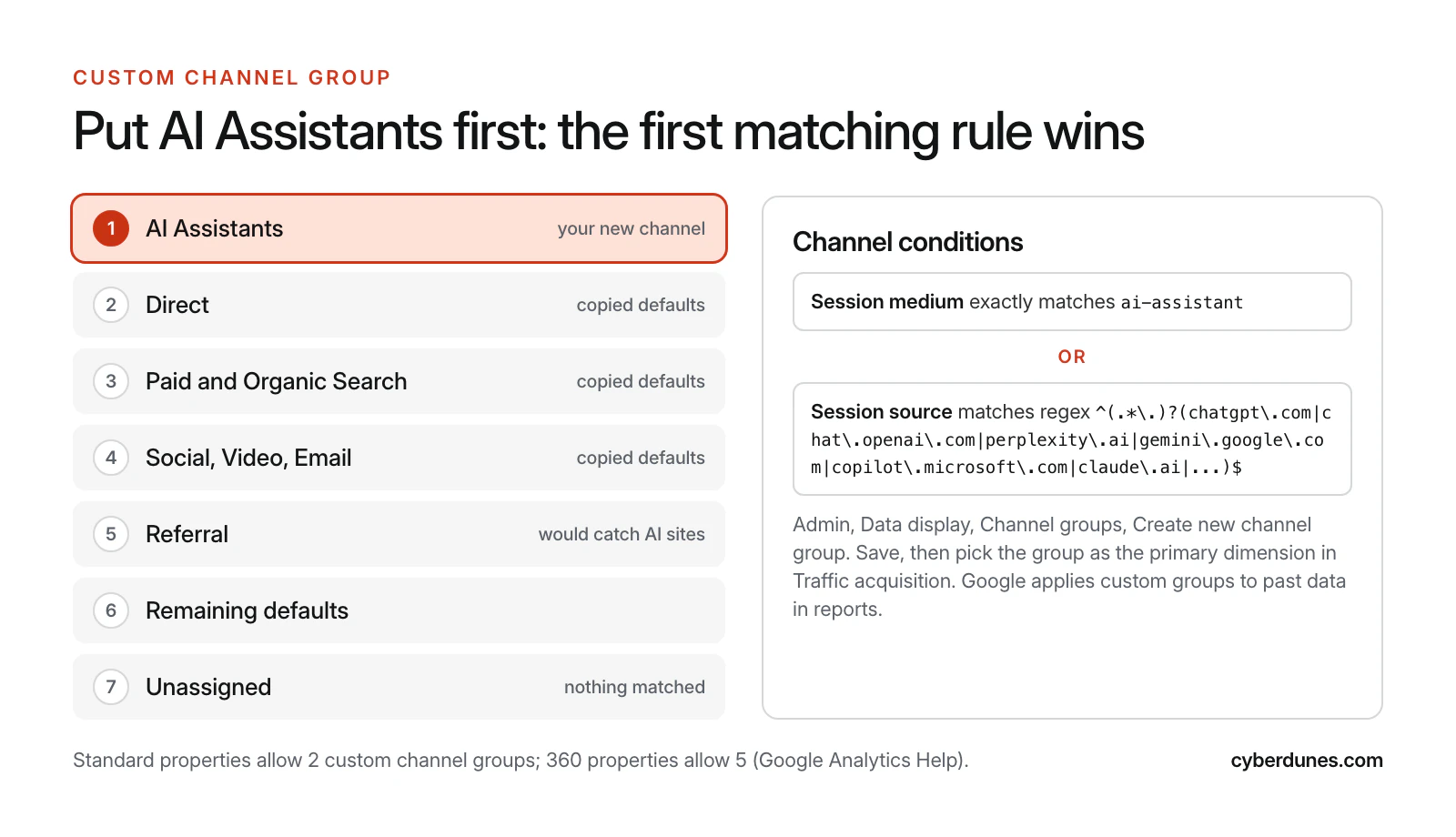
Build one custom channel group with an "AI Assistants" channel at the top. Give it two conditions: the medium Google assigns and a regex on session source. The whole job takes about 20 minutes and needs Editor access to the property.
- Check the built-in channel first. Open Reports, Acquisition, Traffic acquisition and look for the AI Assistant row in the session default channel group. If it has data, Google's rule is working on your property.
- Create the group. Go to Admin, Data display, Channel groups. Copy the default channel group so all the standard channels come with it, then name the copy "Channels with AI".
- Add a channel called "AI Assistants". Condition 1: Session medium exactly matches
ai-assistant. Add an OR condition 2: Session source matches regex, using the pattern below. - Move it to the top. Google's custom channel group documentation says "Traffic is included in the first channel whose definition it matches." The channel must sit above Referral, or Referral will take these sessions. We put it first so no other rule can claim them.
- Save and apply. Standard properties can have 2 custom channel groups and 360 properties can have 5. Google says custom groups "can be applied to your reports retroactively", except in audiences.
- Verify. In Traffic acquisition, switch the primary dimension to your new group and add Session source as a secondary dimension. Every row in AI Assistants should be a domain you expect.
The Regex for AI Assistant Sources
Paste this into the Session source "matches regex" condition. Google's regex documentation says Analytics uses full match by default. That is why the pattern starts with an optional subdomain group and has anchors at both ends.
^(.*\.)?(chatgpt\.com|chat\.openai\.com|perplexity\.ai|gemini\.google\.com|bard\.google\.com|copilot\.microsoft\.com|claude\.ai|chat\.deepseek\.com|grok\.com|meta\.ai|chat\.mistral\.ai|chat\.qwen\.ai|you\.com|duck\.ai|notebooklm\.google\.com)$Three rules keep it accurate. Escape every dot. Do not add a bare openai or google, or you will pull in unrelated traffic. Each month, look at new rows in Referral and add any assistant that appears.
How Do You Report on AI Traffic in GA4?
Use one exploration and one landing page view, and judge AI traffic on key events per session, not on volume. Key events are GA4's name for the actions you mark as important. Google's key events help page explains that events once marked as conversions are "now called 'key events.'"
- Exploration. Go to Explore, Free form. Rows: your custom channel group, then Session source. Values: Sessions, Engaged sessions, Key events, Session key event rate and Total revenue. Filter to the AI Assistants channel for a close-up, or leave it unfiltered to compare with Organic Search.
- Landing pages. In the same exploration, add Landing page + query string as a row under AI Assistants. These are the pages AI engines send people to, and they are your best candidates to improve. Our explainer on how LLMs choose sources to cite explains why some pages get picked over others.
- Key events. Break key events out by event name, such as form submit, demo request or purchase. A few dozen AI sessions with a high key event rate count for more than a large, idle referral source.
A Monthly AI Traffic Reporting Template
| Metric | Where in GA4 or Search Console | Question it answers | Owner |
|---|---|---|---|
| AI Assistants sessions, by source | Traffic acquisition, custom group | Which assistants send us visitors, and is it growing? | Analytics lead |
| Session key event rate: AI vs Organic Search | Free form exploration | Is AI traffic worth more or less than search? | Analytics lead |
| Top 10 AI landing pages | Exploration, landing page row | Which pages do AI engines trust enough to link? | Content lead |
| Unassigned sessions with an AI source | Traffic acquisition, default group | Is the built-in channel missing tagged visits? | Analytics lead |
| AI Overviews and AI Mode impressions | Search Console, generative AI report | How often Google shows our pages in AI answers | SEO lead |
| Direct sessions on deep pages | Exploration, Direct channel, landing page | Is dark AI traffic rising? | Analytics lead |
When AI visitors land on a page and leave, the next step is conversion work, not more tracking. Our guide to conversion rate optimization when AI search cuts your traffic covers which fixes to make first.
What Can't GA4 See About AI Traffic?
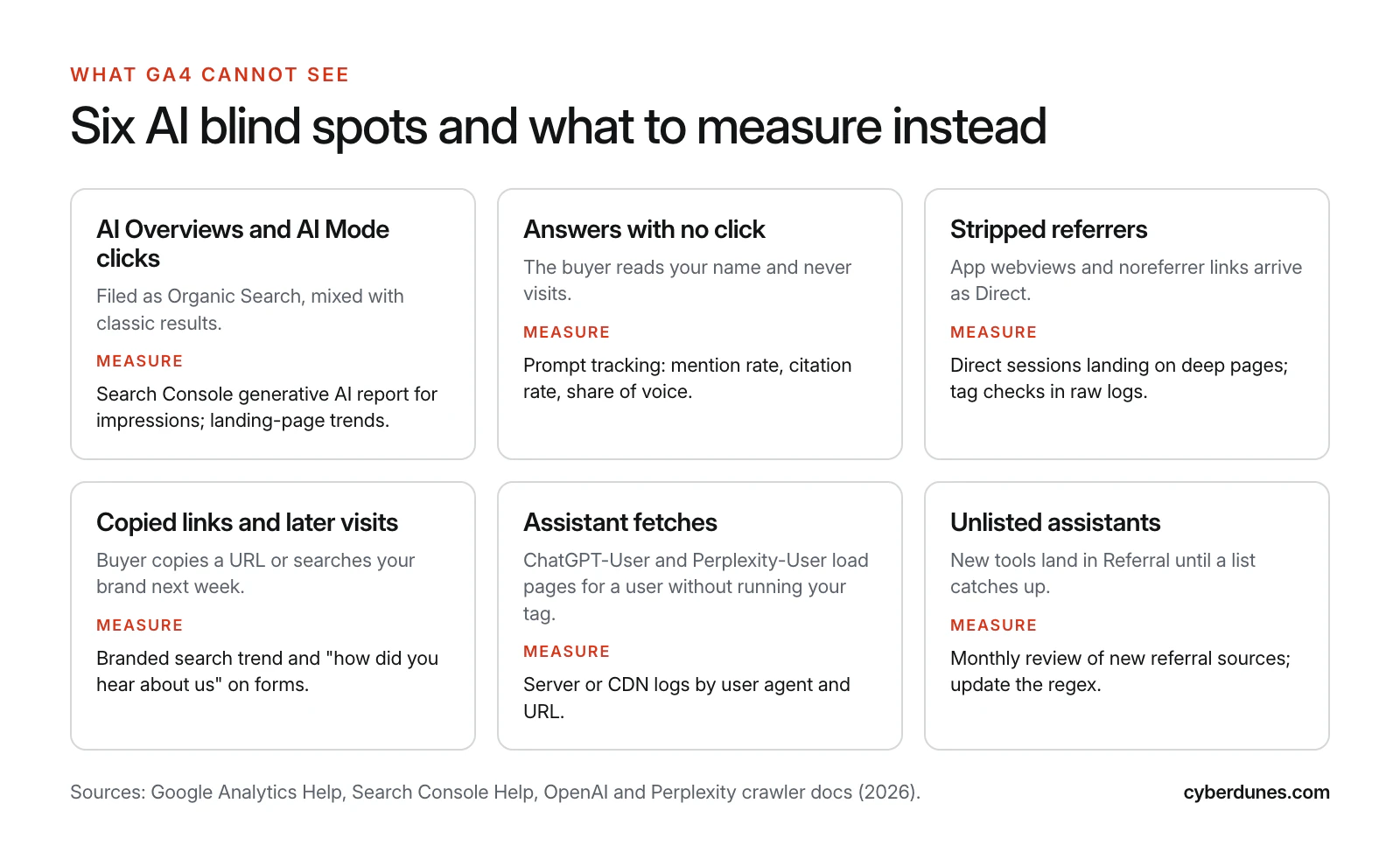
GA4 records sessions on your site. It cannot see an AI answer that named your brand but sent no click, a Google AI feature click it files as organic, or a visit with no referrer or tag. Each of these needs a different measure.
| Blind spot | Why GA4 misses it | What to measure instead |
|---|---|---|
| AI Overviews and AI Mode clicks | Google defines Organic Search as including AI Overviews and AI Mode | Search Console generative AI report for impressions; trends on affected landing pages |
| Answers with no click | No visit happens | Prompt tracking: mention rate, citation rate and share of voice |
| Stripped referrers and app webviews | No referrer and no tag, so the visit is Direct | Direct sessions on deep pages; raw log checks for utm_source |
| Copied links and later brand searches | The visit happens days later through another channel | Branded search trend; a "how did you hear about us" field with an AI option |
| Assistant fetches for a user | The page loads on the assistant's server, and your tag never runs | Server or CDN logs filtered by user agent |
| Assistants not yet on any list | They fall into Referral | A monthly review of new referral sources |
Google AI Overviews and AI Mode
You cannot separate AI Overviews or AI Mode clicks in GA4. Google's own definition of Organic Search includes them. Search Console is the closest view. Its Performance report documentation says "Clicking a link to an external page in AI Mode counts as a click," and that all links in an AI Overview share a single position. Those clicks sit inside the Web search type totals.
Search Console's generative AI performance report reached all websites worldwide on August 31, 2026. It shows "how many times links to your site were shown to a user in a generative AI feature on Google Search," by page, country, device and date. Use it to tell which pages Google shows in AI answers. Then read those pages' organic sessions in GA4 alongside it.
Clicks are also getting harder to win. A Pew Research Center study of March 2025 browsing data found that users who saw an AI summary clicked a traditional result in 8% of visits, against 15% for users who did not see one. That gap is why we plan for zero-click search as well as clicks. For Google's AI answers specifically, see our guide to getting into Google AI Mode answers.
How to Sanity-Check GA4 With Server Logs
Server logs record every request, whether or not your tag runs. They show whether GA4 is undercounting AI traffic and which pages assistants fetch for their users. Run the check once a month on the same 30-day window you report in GA4.
- Count tagged landings. Count requests whose URL contains
utm_source=chatgpt.com, grouped by path. Compare the total with ChatGPT sessions in GA4. A large gap points to consent banners, ad blockers or tags that fire late. - Count assistant fetches. OpenAI's crawler documentation says ChatGPT-User is used "for certain user actions in ChatGPT" and "is not used for crawling the web in an automatic fashion." Perplexity's bot documentation says Perplexity-User "supports user actions within Perplexity." These hits show which pages people ask assistants about, even when nobody clicks.
- Check referrers. Pull requests whose Referer header contains an assistant domain. If logs show them and GA4 does not, check whether your tag runs on those landing pages.
- Watch deep-page Direct. Direct traffic to a long, specific guide is rarely someone typing the URL. If it rises in the same weeks that assistant fetches rise for that page, treat it as likely dark AI traffic and say so in your report.
On a standard Nginx or Apache combined log, where the request path is the seventh field, these two commands give you a starting count:
grep -E "ChatGPT-User|Perplexity-User" access.log | awk '{print $7}' | sort | uniq -c | sort -rn | head -20
grep "utm_source=chatgpt.com" access.log | awk '{print $7}' | cut -d'?' -f1 | sort | uniq -c | sort -rn | head -20
Before you act on these numbers, decide which AI crawlers you let in at all. Our guide on which AI bots to allow, block or charge explains how ChatGPT-User differs from training crawlers.
How Should You Read AI Traffic Numbers?
Read AI traffic as a quality signal with a known undercount, not as a full count. For most sites the volume is still small. What it tells you is which pages AI engines trust and how ready those visitors are to act.
Outside data supports that reading. TechCrunch, reporting Adobe Analytics data covering over 1 trillion visits to US retail sites, said AI traffic rose 393% year over year in Q1 2026 and converted 42% better than non-AI traffic in March 2026. Your numbers will differ, so measure your own key event rate against Organic Search before you move budget.
Three rules keep the report honest:
- Report AI Assistants sessions and Unassigned sessions with an AI source side by side until the gap closes.
- Show trends over at least 8 weeks. Small numbers jump around from week to week.
- Keep the blind-spot table in the report, so leaders read the GA4 figure as a minimum.
Once you need to split budget across channels you cannot track at the click level, you are in marketing mix modeling territory. Our guide covers when that is worth it.
A 30-Day Rollout Plan
You can have a trustworthy AI traffic view running in four weeks with one analyst and a few hours from SEO and content.
| Week | Task | Owner | Effort |
|---|---|---|---|
| 1 | Audit the AI Assistant channel, Unassigned and Referral rows; confirm key events and the Search Console link | Analytics lead | 3 hours |
| 1 | Create the custom channel group with the regex; verify sources | Analytics lead | 1 hour |
| 2 | Build the free form exploration and landing page view; share with the team | Analytics lead | 3 hours |
| 2 | Add an AI option to "how did you hear about us" on lead forms | Web team | 2 hours |
| 3 | Run the server log check; compare with GA4 | Developer | 4 hours |
| 3 | Set up prompt tracking for 20 to 50 buyer prompts | SEO lead | 4 hours |
| 4 | Publish the first monthly report from the template; pick 3 AI landing pages to improve | Analytics and content leads | 4 hours |
How Cyberdunes and Apex® Help You Measure AI Traffic
GA4 shows you the AI visits that reach your site. Apex® covers the AI answers that never send a click. Apex® connects to Google Analytics and your CRM through its API layer, as set out in our integrations guide. Its prompt tracking runs buyer prompts across ChatGPT, Gemini, Claude, Perplexity and Google AI Overviews. Citation reporting shows which of your pages those answers link to.
Put the two together and you can answer the full question: how often AI names you, how often it links to you, and what those visitors do next. Start with a free check to see how AI engines describe your brand today, and read our AI visibility checker guide to understand the metrics.
Run a Free AI Visibility Check
Sources
- What's new in Google Analytics (release notes), Google Analytics Help, May and June 2026 entries
- [GA4] Default channel group, Google Analytics Help, accessed October 2026
- [GA4] Custom channel groups, Google Analytics Help, accessed October 2026
- [GA4] About regular expressions, Google Analytics Help, accessed October 2026
- [GA4] About key events, Google Analytics Help, accessed October 2026
- OpenAI Drops UTM Parameters From ChatGPT Results, Search Engine Roundtable, October 2026
- AIAssistants.yml referrer list, Matomo on GitHub, accessed October 2026
- Performance report data: AI Overviews and AI Mode, Search Console Help, accessed October 2026
- Generative AI performance report (Search), Search Console Help, August 2026
- Overview of OpenAI crawlers, OpenAI, accessed October 2026
- Perplexity crawlers, Perplexity, accessed October 2026
- Google users are less likely to click on links when an AI summary appears in the results, Pew Research Center, July 2025
- AI traffic to US retailers rose 393% in Q1, TechCrunch, April 2026