
Design for AI agents is the practice of building pages that software agents can read and operate as reliably as people can. In practice that is semantic HTML, a clean accessibility tree, predictable controls and machine-readable facts, so an agent asked to compare, book or buy on your site finishes the task instead of giving up.
Key Takeaways
- Your website now has two kinds of users: people, and AI agents acting for people. Browser agents from OpenAI, Google, Anthropic and Perplexity can already click, type and check out.
- Agents read pages through screenshots, the DOM and the accessibility tree. The accessibility tree is the most reliable of the three, and it is the same tree screen readers use.
- Most agent failures are old accessibility bugs: clickable divs, unlabeled fields, icon-only buttons, hover-only menus and stacked pop-ups.
- Structured data and plain-text policies let agents quote your prices, stock and returns correctly instead of guessing.
- New standards (MCP, WebMCP, NLWeb and agentic commerce protocols) are worth tracking, but most sites gain more this quarter from fixing markup.
- Use the 20-point audit and 30-day plan below to move one level up the agent-readiness ladder.
This guide is for marketing leaders, product owners and founders who own a website that sells, books or generates leads. It is written by the Cyberdunes design team, which has done UX consulting and UI design on scalable products for more than eight years. The checklist below comes from that practice, and every check in it can be run by your own team without special tools.
What Is Agent Experience (AX)?
Agent experience (AX) is the quality of the experience an AI agent has when it uses your product or website. The term was introduced by Netlify co-founder Mathias Biilmann in January 2025, who defined it as "the holistic experience AI agents will have as the user of a product or platform."
AX sits next to user experience (UX) and developer experience (DX). UX asks whether a person can reach their goal. AX asks whether an agent, sent by that person, can reach the same goal without a human stepping in. The two overlap heavily. A form that a screen reader user can complete is usually a form an agent can complete.
The business case is simple. When a buyer asks an assistant to "find a 3-night stay in Goa under 15,000 rupees and book the best-rated one," the agent shortlists sites it can actually operate. If your booking flow stalls it, the agent moves to a competitor and the buyer may never see your brand. We covered the wider shift in our piece on the UX shifts product teams cannot ignore.
Which AI Agents Are Using Websites Today?
Every major AI company now ships an agent that can operate a browser. Some run in your visitor's own browser; others run in a separate browser that the agent controls. The table lists what we could verify from vendor documentation and announcements as of October 2026.
| Agent | Maker | How it sees the page | Status (verified) |
|---|---|---|---|
| Gemini 2.5 Computer Use | Screenshot, current URL and recent action history | Developer model since October 2025; versions also power Project Mariner and some agentic features in AI Mode | |
| Comet browser | Perplexity | A full browser with a built-in assistant that acts on open pages | Released free worldwide in October 2025 |
| Claude for Chrome | Anthropic | Sees the active tab, clicks buttons and fills forms | Available to Pro, Team and Enterprise plans since December 2025 |
| Computer use tools | OpenAI and Anthropic | Screenshots plus mouse and keyboard actions | Available to developers through the OpenAI and Claude APIs |
| ChatGPT agent | OpenAI | Signs its HTTP requests with Web Bot Auth | Listed by Cloudflare as one of the first signed agents in August 2025 |
Agents differ in how they see a page, but they all fail on the same weak spots. That is good news: one set of fixes serves all of them.
How Do AI Agents Perceive a Web Page?
Agents read a page through up to four layers: the rendered screenshot, the HTML and DOM, the accessibility tree, and any data or tools the site declares on purpose. The more an agent can rely on the last two, the faster and more accurately it works.
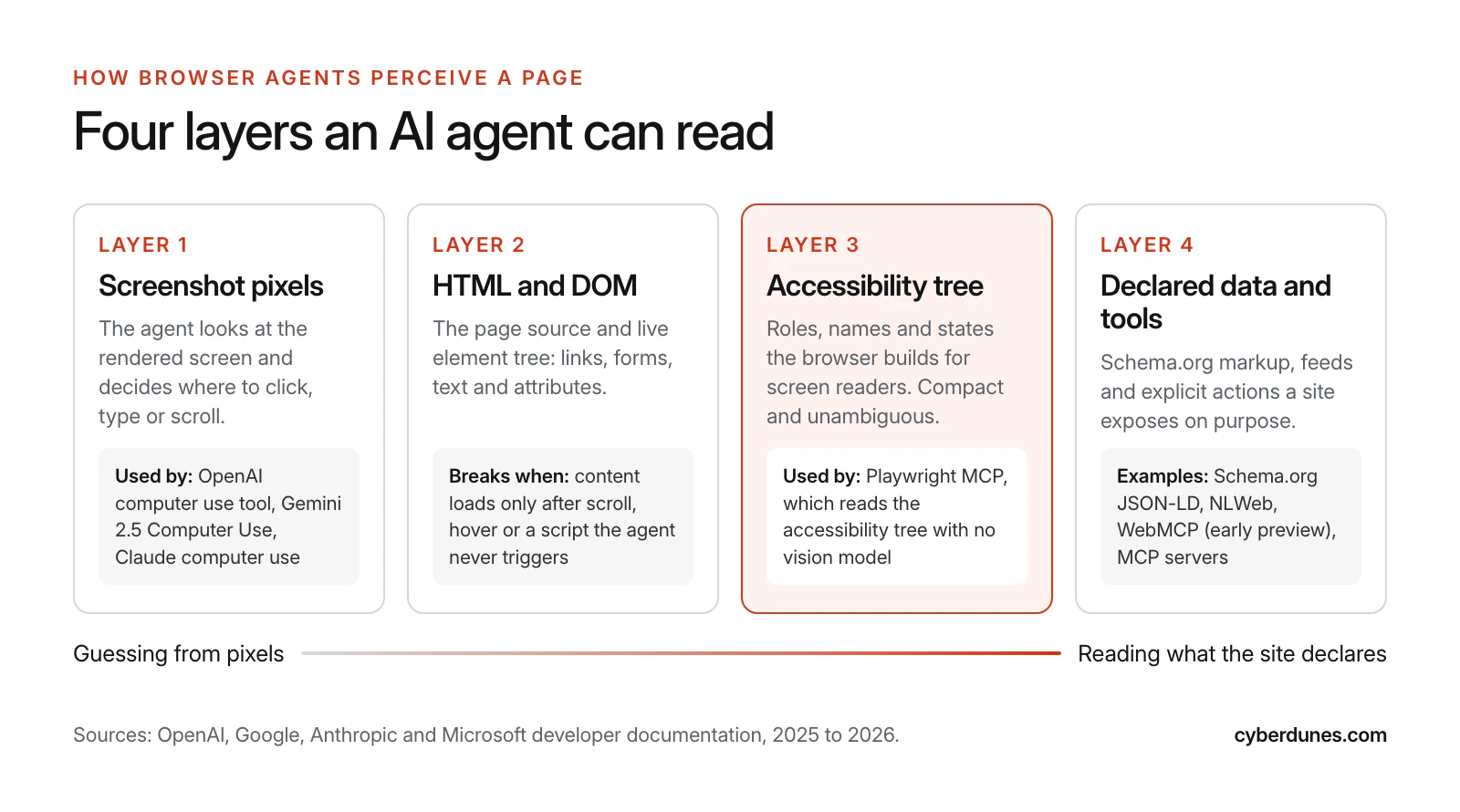
- Screenshots. Computer use models look at the screen and return clicks and keystrokes. Google describes the Gemini model's loop as a user request, "screenshot of the environment, and a history of recent actions," followed by an action and a new screenshot (Google, October 2025). Anything that is visually ambiguous, such as two identical icons, slows this loop down.
- HTML and DOM. Text agents read source and live elements. Content that appears only after hover, scroll or a script the agent never fires is invisible to them.
- Accessibility tree. The browser's list of roles, names and states, built for screen readers. Microsoft's Playwright MCP server, a common way to give agents a browser, "uses Playwright's accessibility tree, not pixel-based input" and needs no vision model (Microsoft on GitHub).
- Declared data and tools. Schema.org markup, feeds and explicit actions, covered in the standards section below.
The practical lesson: you cannot design for one agent's perception. Design so that all four layers tell the same story.
Why Is Accessible Design Also Agent Design?
Accessible design is agent design because agents and assistive technology consume the same signals: native elements, accessible names, visible labels and keyboard operability. If a screen reader can announce a control correctly, an agent can usually find and use it.
The W3C's first rule of ARIA says that if a native HTML element already has the semantics and behavior you need, use it instead of repurposing another element and adding ARIA (W3C, Using ARIA). The data shows why. In the WebAIM Million 2026 report, home pages that used ARIA averaged 59.1 detected errors, against 42 on pages without it. More ARIA often means more custom widgets, and more places for names and roles to go wrong.
The same report shows how common the agent-breaking bugs are: 51% of home pages had unlabeled form inputs, 46.3% had links with no text and 30.6% had buttons with no text. Each of those is a control an agent cannot identify by name. Our WCAG 2.2 AA checklist covers how to find and fix them with owners and effort estimates.
Before and After: One Control, Two Agent Views
Here is a common pattern on ecommerce sites. The "before" version works for a sighted mouse user and nobody else.
<!-- Before -->
<div class="btn" onclick="add(42)">
  <svg>...</svg>
</div>

<!-- After -->
<form action="/cart" method="post">
  <button type="submit" name="sku" value="42">
    Add to cart: Linen shirt, size M
  </button>
</form>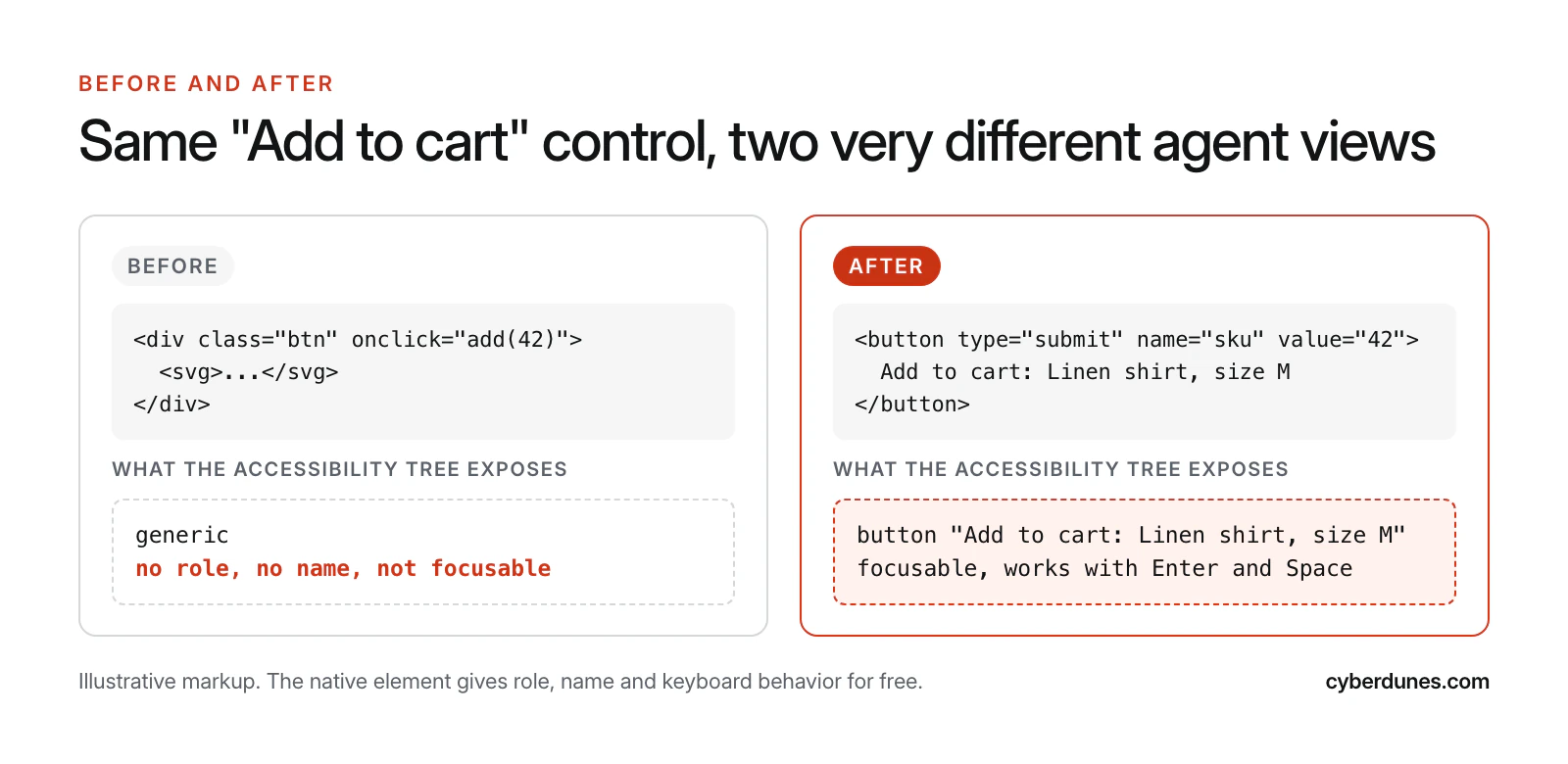
The "after" version also works without JavaScript, which matters for text-based agents, and its accessible name tells the agent exactly which product and size it is adding. It is a small change that removes a whole class of failed purchases.
What Breaks AI Agents on Websites?
Agents fail on the same patterns that fail keyboard and screen reader users, plus a few that are specific to automation, such as puzzle CAPTCHAs and facts locked in images. Fix the eight below first.
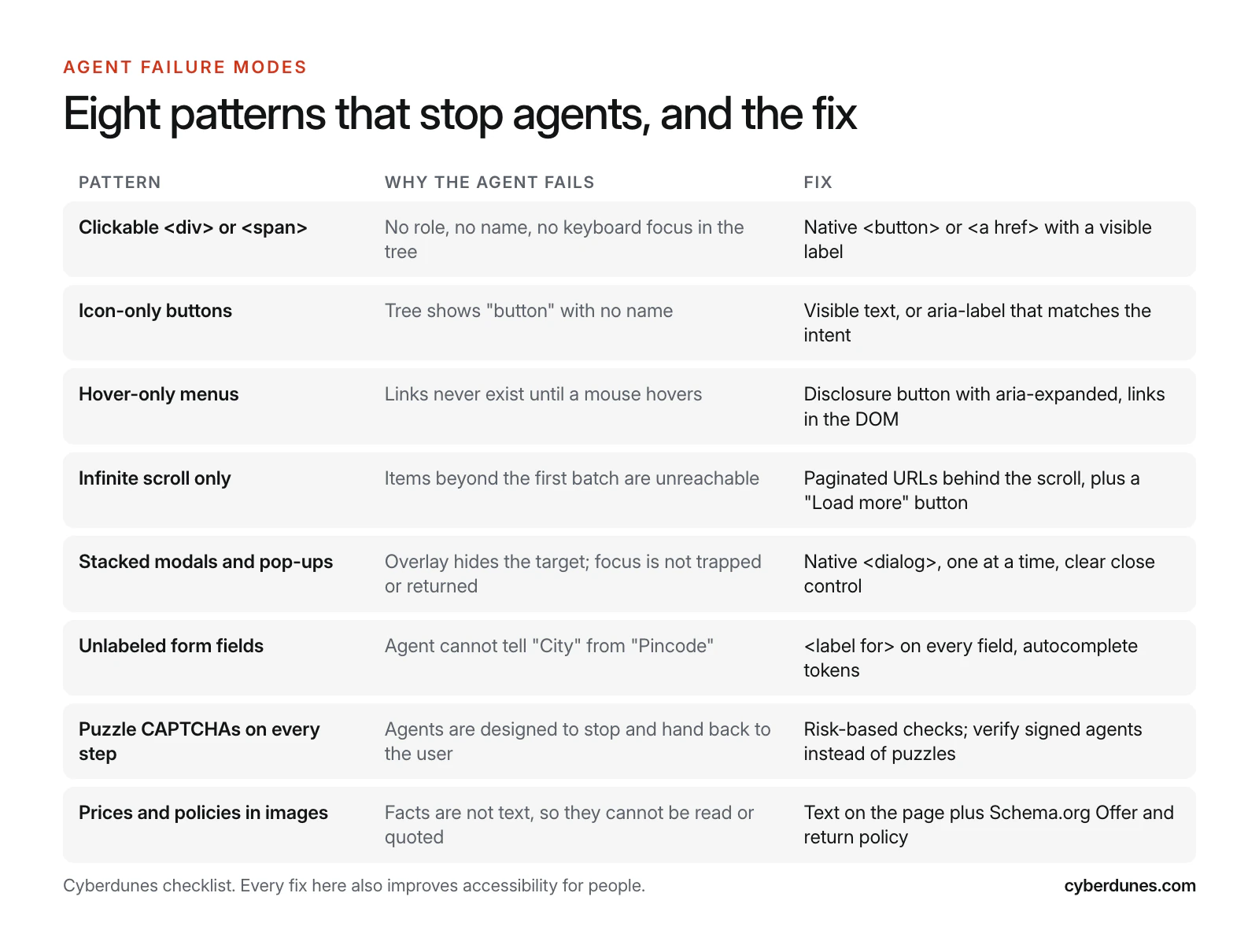
Two of these need a business decision, not only a code change:
- CAPTCHAs and bot walls. Agent makers tell their agents to hand control back to a person at sensitive steps. Anthropic's computer use guidance, for example, asks developers to have a human confirm decisions "such as accepting cookies, completing financial transactions, or agreeing to terms of service" (Anthropic documentation). A puzzle on every step makes that hand-off constant. Cloudflare's signed agents program, which uses cryptographic Web Bot Auth signatures, offers a way to recognize legitimate agents instead of blocking all automation. Decide which bots you allow first; our guide to which AI crawlers to allow, block or charge walks through that choice.
- Infinite scroll. Keep it if your engagement data supports it, but give every batch a real paginated URL and a "Load more" button, so agents and people can reach item 61.
Security: Make Agents Welcome Without Making Them Dangerous
An agent-friendly site must not become an attack surface. Agents can be tricked by instructions hidden in page content, known as prompt injection. When Anthropic tested Claude for Chrome against deliberate attacks, the attack success rate was 23.6% before mitigations and 11.2% after, in autonomous mode (Anthropic, August 2025). OpenAI's guidance is that page text "cannot grant permission or override the user's instructions," and it asks developers to keep humans in control of purchases and irreversible changes (OpenAI documentation).
For site owners that means three rules. Moderate user-generated content such as reviews and Q&A, because it is where injected instructions hide. Keep explicit confirmation steps for payments, account changes and data sharing. And never rely on the agent to enforce your business rules: validate prices, stock and limits on the server, exactly as you would for a human. Our website security checklist covers the server-side basics.
How Do Structured Data and Machine-Readable Policies Help Agents?
Structured data gives agents facts they can trust without interpreting your layout. Product, Offer, Organization and FAQ markup in Schema.org JSON-LD tells an agent the price, currency, stock status and seller in a fixed format.
Policies matter as much as prices. An agent comparing two stores will check delivery and returns before it recommends one. Google already supports MerchantReturnPolicy markup, which can be set once at the Organization level and overridden per offer, with properties such as returnPolicyCategory, merchantReturnDays and returnFees (Google Search Central). Publish the same policy as plain text on a stable URL, and make sure the two match.
Checklist for machine-readable facts:
- Prices, sizes, stock and delivery dates appear as text in the HTML, not only in images or after a script runs.
- Product and Offer markup matches the visible page exactly, including currency.
- Returns, shipping, cancellation and warranty policies live on their own URLs and are marked up where a schema exists.
- Contact options, opening hours and locations are consistent across your site and public profiles.
- An llms.txt file points AI systems to your most useful pages. See how llms.txt, IndexNow and Schema.org work in Apex®.
The same signals help AI search engines quote you correctly, which is the core of generative engine optimization (GEO). Our explainer on how LLMs choose sources to cite shows why consistent facts across pages matter.
Which Emerging Standards Should You Track?
Four standards are worth tracking: MCP for connecting agents to data and tools, WebMCP for exposing page actions to browser agents, NLWeb for natural-language access to site content, and the Agentic Commerce Protocol for checkout. Only some are ready for production, so match your investment to their maturity.
| Standard | What it does | Status (October 2026) | Action now |
|---|---|---|---|
| Model Context Protocol (MCP) | Open standard for connecting AI assistants and agents to tools and data | Donated to the Linux Foundation's Agentic AI Foundation in December 2025; more than 10,000 active public servers and adoption by ChatGPT, Cursor, Gemini, Microsoft Copilot and VS Code (Anthropic) | Expose content or catalog data through an MCP server if you already have APIs |
| WebMCP | Lets a web page offer JavaScript tools, or annotated HTML forms, to browser agents | Available for prototyping to early preview program participants in Chrome since February 2026 | Prototype on one high-value form; do not depend on it yet |
| NLWeb | Open project from Microsoft for natural-language interfaces built on Schema.org, RSS and similar data; every NLWeb instance is also an MCP server | Announced May 2025 | Clean Schema.org and feeds first; they are the input NLWeb uses |
| Agentic Commerce Protocol (ACP) | Checkout flows between buyers, AI agents and businesses; the merchant stays merchant of record | Open source under Apache 2.0, developed by Stripe and OpenAI (agenticcommerce.dev) | Evaluate if you sell through ChatGPT or use Stripe |
For retailers, our guide to preparing a store for AI shopping agents covers the commerce protocols in depth, our news brief on Google's agentic checkout tracks Google's side, and MCP for marketing teams explains where MCP fits in a content operation.
The Agent-Readiness Audit: A 20-Point Checklist
An agent-readiness audit tests whether an agent can find, understand and complete your top tasks. Run it on your three most valuable journeys, such as "find a product and add it to cart," "book a demo" and "check the returns policy." Each check below has a test you can run without special tools.
| # | Check | How to test | Owner | Effort |
|---|---|---|---|---|
| 1 | Agents are not blocked at the edge | Review robots.txt, CDN bot rules and WAF logs for agent user agents | DevOps | Low |
| 2 | Core content is in server HTML | View source; key text and prices must be present without JavaScript | Developer | Medium |
| 3 | One H1 and a logical heading order | Browser accessibility panel or a headings bookmarklet | Content | Low |
| 4 | Landmarks for header, nav, main and footer | Accessibility tree shows banner, navigation, main, contentinfo | Developer | Low |
| 5 | Every control is a native button or link | Search templates for onclick on div or span | Developer | Medium |
| 6 | Every control has a clear accessible name | Automated scan for empty buttons and links | Developer | Low |
| 7 | Every field has a visible label | Click each label; focus must move to its field | Designer | Low |
| 8 | Autocomplete tokens on address and contact fields | Inspect inputs for autocomplete values such as email and postal-code | Developer | Low |
| 9 | Error messages are text and tied to fields | Submit an empty form; read the messages aloud with a screen reader | Designer | Medium |
| 10 | Menus open on click and keyboard, not hover only | Tab through the header with no mouse | Developer | Medium |
| 11 | Lists have paginated URLs | Load page 3 directly by URL | Developer | Medium |
| 12 | One dialog at a time, with a named close button | Trigger cookie, newsletter and chat prompts on one page view | Marketing | Low |
| 13 | No puzzle CAPTCHA before checkout or enquiry | Complete the journey in a fresh browser profile | Product | Medium |
| 14 | Prices and stock match markup | Compare visible values with the Rich Results Test output | Ecommerce | Low |
| 15 | Policies on stable, marked-up URLs | Open returns, shipping and cancellation pages; check schema | Legal and content | Low |
| 16 | Confirmation step before payment or data sharing | Walk the checkout; there must be an explicit review step | Product | Low |
| 17 | Server-side validation of price, stock and limits | Tamper with a request in a test environment | Developer | Medium |
| 18 | User-generated content is moderated | Review reviews and Q&A for hidden instructions or links | Community | Ongoing |
| 19 | A browser agent completes each top journey | Give Claude for Chrome, Comet or a computer use demo the task in plain words | UX | Medium |
| 20 | Agent traffic is visible in analytics and logs | Segment known agent user agents and signed requests | Analytics | Medium |
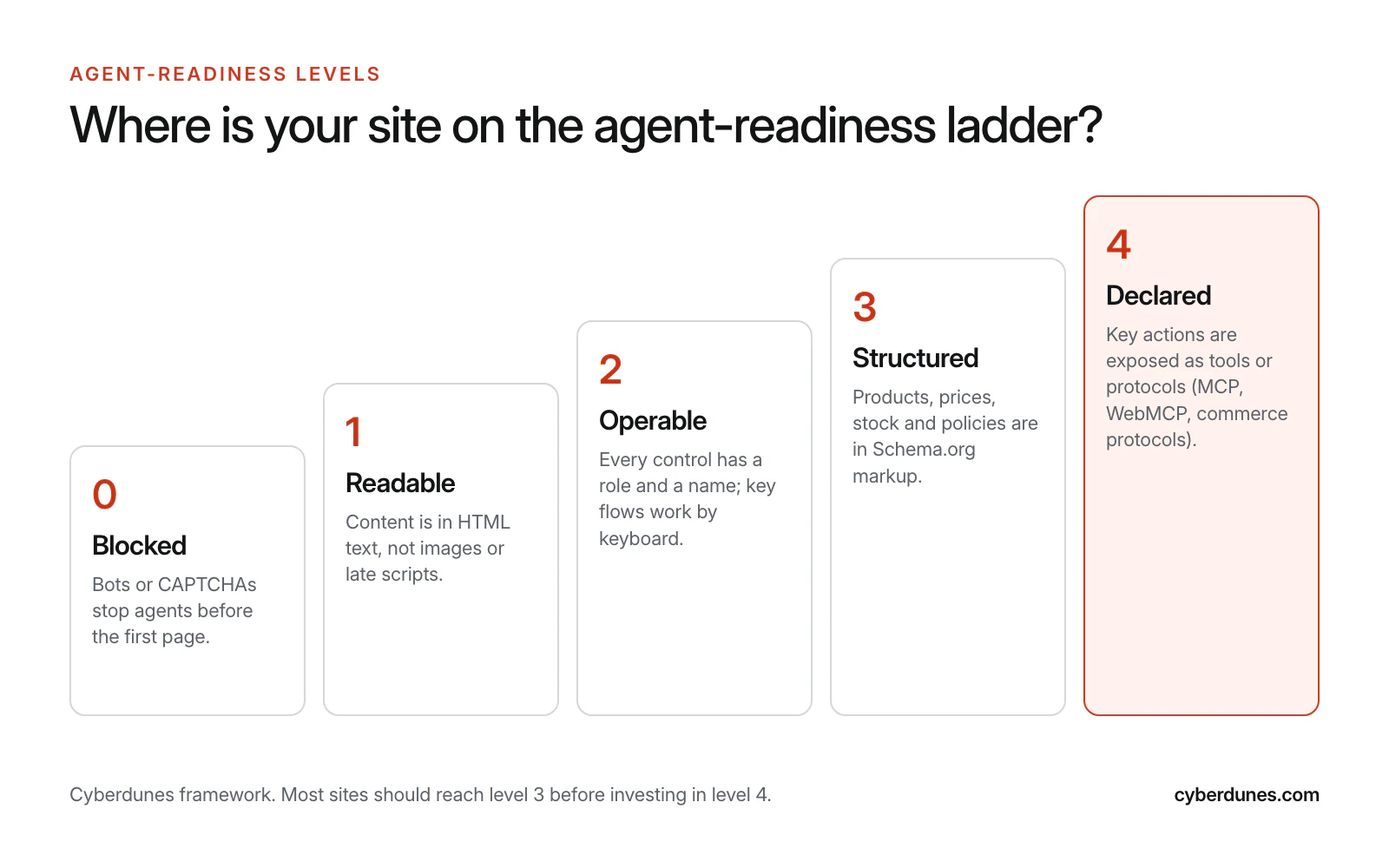
Check 19 teaches the most. Watch where the agent hesitates: every pause is a label, a name or a layout ambiguity you can fix. Then score your site on the ladder below.
A 30-Day Plan to Make Your Site Agent-Ready
Thirty days is enough to move most marketing and ecommerce sites from level 1 or 2 to level 3. The plan assumes one developer, one designer and a product or marketing owner.
- Days 1 to 3: Pick journeys and baseline. Choose three journeys tied to revenue. Run checks 1 to 20 and record pass or fail. Ask a browser agent to complete each journey and screen-record the attempts.
- Days 4 to 10: Fix controls and forms. Replace clickable divs with native elements, name every icon button, label every field and add autocomplete tokens. These fixes usually live in a few shared components, so one change repairs hundreds of pages.
- Days 11 to 17: Fix structure. Make menus keyboard and click operable, add paginated URLs behind infinite scroll, limit pop-ups to one at a time and move key facts out of images.
- Days 18 to 24: Publish machine-readable facts. Align Product, Offer, Organization and return policy markup with visible content. Publish policies on stable URLs and add llms.txt.
- Days 25 to 30: Retest and set guardrails. Rerun the agent tests and the audit. Add automated accessibility checks to your release pipeline so regressions fail the build, and review agent traffic monthly.
Teams that want to build these skills in-house can start with our UX/UI Masterclass, which covers accessible interaction design from first principles.
Get an agent-readiness review from our UX team
How Cyberdunes and Apex® Help You Design for AI Agents
Our UX and UI design services run the audit above on your real journeys, fix the shared components and test with both screen readers and browser agents. We focus on the changes that help human visitors and agents at the same time, so the work pays back even before agent traffic grows.
If your site runs on Apex®, the AI-native digital experience platform (DXP), several level 3 and level 4 building blocks are already there: Schema.org JSON-LD and metadata, XML sitemaps, IndexNow and llms.txt, plus MCP support so assistants can work with your Apex® content through a standard interface (see connecting AI assistants with MCP). Apex® also tracks how ChatGPT, Gemini, Claude, Perplexity and Google AI Overviews describe and cite your brand, which tells you whether AI assistants are getting your facts right. None of this guarantees that an agent will choose you; it removes common reasons it would not.
Sources
- Introducing AX (Mathias Biilmann, January 2025)
- Introducing the Gemini 2.5 Computer Use Model (Google, October 2025)
- Comet Is Now Available to Everyone Worldwide (Perplexity, October 2025)
- Claude for Chrome (Anthropic, August 2025, updated December 2025)
- Computer Use Tool Guide (OpenAI developer documentation, 2026)
- Computer Use Tool (Anthropic developer documentation, 2026)
- Playwright MCP (Microsoft, GitHub)
- Using ARIA (W3C)
- The WebAIM Million, 2026 Report (WebAIM, March 2026)
- Signed Agents and Web Bot Auth (Cloudflare, August 2025)
- Merchant Return Policy Structured Data (Google Search Central)
- Donating the Model Context Protocol and Establishing the Agentic AI Foundation (Anthropic, December 2025)
- WebMCP Early Preview (Chrome for Developers, February 2026)
- Introducing NLWeb (Microsoft, May 2025)
- Agentic Commerce Protocol (Stripe and OpenAI)