
A WCAG 2.2 AA checklist is a list of the Web Content Accessibility Guidelines success criteria at Levels A and AA, each with a test, an owner and an effort estimate. It turns "is our site accessible?" into tasks your team can finish, and it is the baseline that European, US and Indian rules point to.
Key Takeaways
- WCAG 2.2 added nine success criteria, six of them at Levels A and AA, and removed 4.1.1 Parsing. Every other WCAG 2.1 criterion carries over.
- The European Accessibility Act has applied since 28 June 2025 to services such as ecommerce and banking sold in the EU.
- US state and local governments now have until 26 April 2027 or 26 April 2028 to meet WCAG 2.1 AA, after an April 2026 extension; their contractors are covered too.
- In India, the Supreme Court held in April 2025 that digital access is part of the right to life, and regulators such as SEBI have ordered accessibility audits.
- WebAIM found detected WCAG failures on 95.9% of the top one million home pages in 2026. Six fixable error types cause 96% of them.
- The prioritized checklist and 60-day plan below get most marketing and ecommerce sites to a defensible baseline.
This guide is for founders, marketing heads, product owners and CTOs who need to know what accessibility law asks of their website in 2027 and how to get there without a year-long program. It is written by the Cyberdunes design team, which has done UX consulting and UI design on scalable products for more than eight years. It is practical guidance, not legal advice; confirm obligations in each market with counsel.
What Is WCAG 2.2 and What Changed?
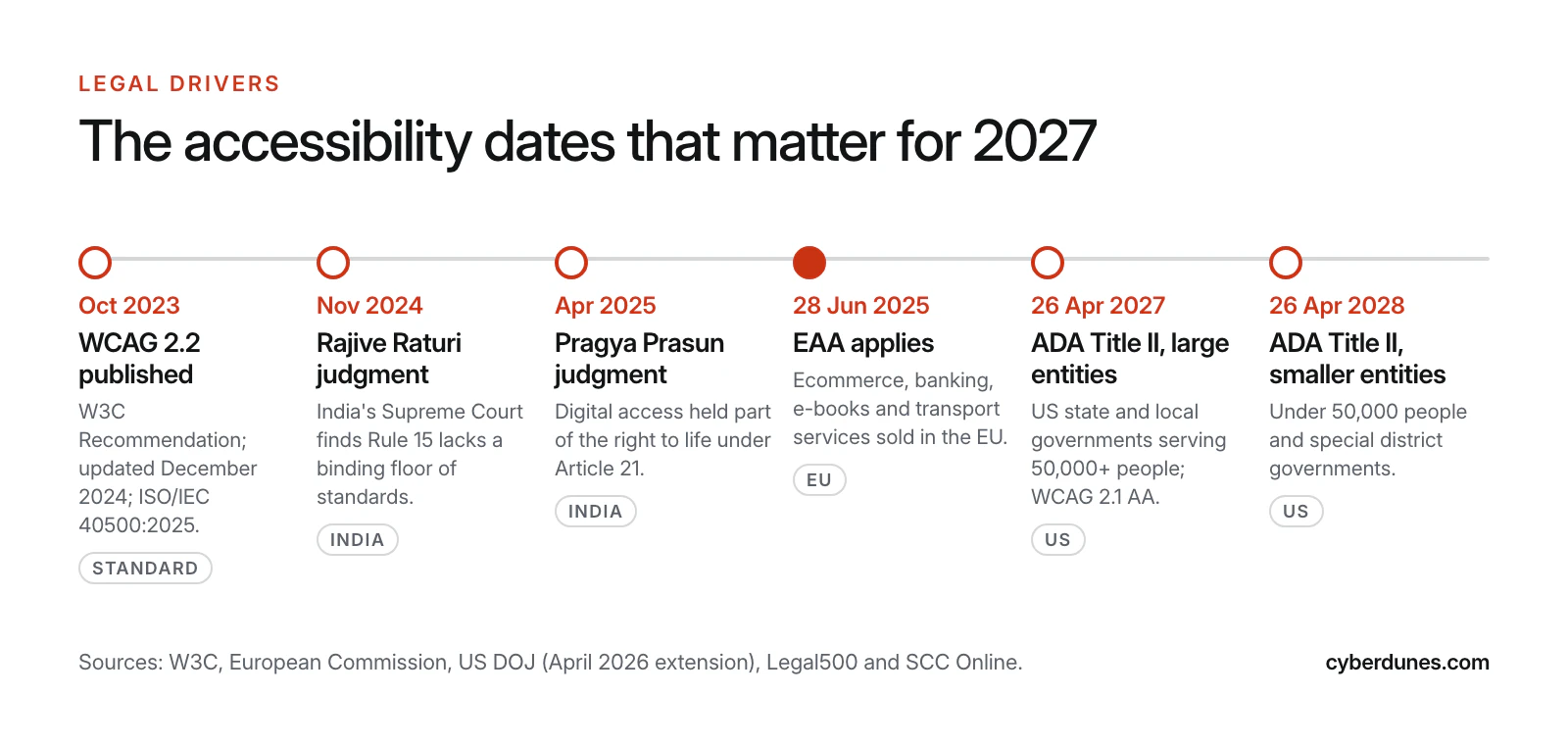
WCAG 2.2 is the current version of the W3C's Web Content Accessibility Guidelines. It became a W3C Recommendation on 5 October 2023, was updated in December 2024 and is also an approved ISO standard, ISO/IEC 40500:2025 (W3C). W3C encourages organizations to use the latest version.
The update is small and focused. It adds nine success criteria and removes one (W3C, What's New in WCAG 2.2):
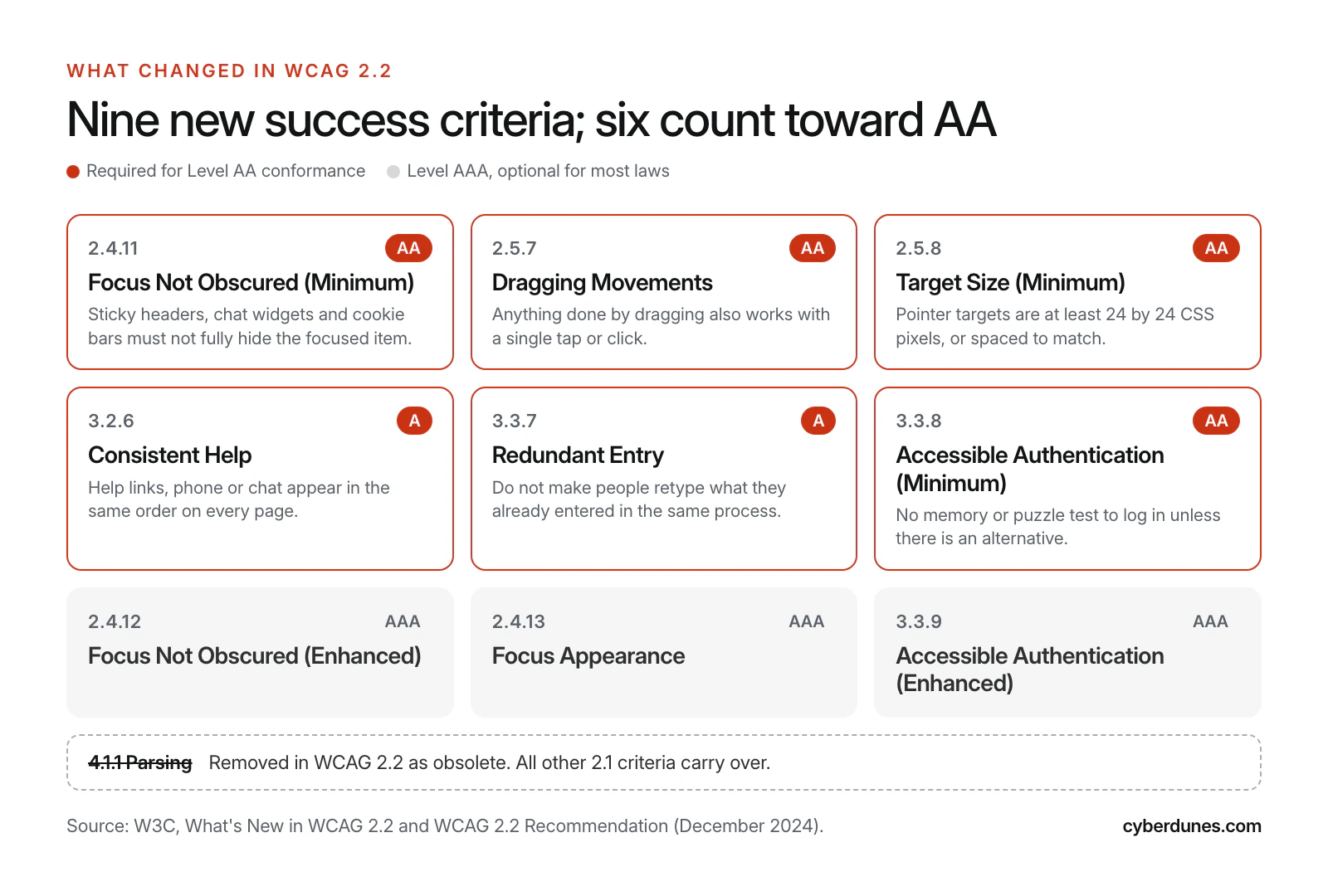
- 2.4.11 Focus Not Obscured (Minimum), AA: when an element receives keyboard focus, it must not be entirely hidden by content the site added, such as sticky headers or cookie banners.
- 2.5.7 Dragging Movements, AA: anything done by dragging must also work with a single pointer without dragging.
- 2.5.8 Target Size (Minimum), AA: pointer targets must be at least 24 by 24 CSS pixels, with exceptions for spacing, inline links and equivalent controls (Wcag 2.2).
- 3.2.6 Consistent Help, A: help options repeated across pages, such as contact details or chat, must appear in the same relative order.
- 3.3.7 Redundant Entry, A: information a user already gave in the same process must be auto-filled or selectable, not typed again.
- 3.3.8 Accessible Authentication (Minimum), AA: no step of login may require a cognitive function test, such as remembering a password or solving a puzzle, unless there is an alternative or a mechanism to help. W3C's notes name password manager support and copy and paste as examples.
The three Level AAA additions (2.4.12, 2.4.13 and 3.3.9) are good practice but rarely required by law. The removed criterion, 4.1.1 Parsing, was written for assistive technology that parsed HTML directly; W3C says it "no longer has utility and is removed." In practice, if you already meet WCAG 2.1 AA, moving to 2.2 AA means testing six new criteria, not starting over.
Which Laws Require WCAG Compliance in 2026 and 2027?
Three regimes matter most for Cyberdunes readers: the European Accessibility Act for anyone selling into the EU, the ADA Title II web rule for anyone serving US public bodies, and India's Rights of Persons with Disabilities Act, 2016 (RPwD Act), as interpreted by the Supreme Court.
European Accessibility Act (EAA)
The European Accessibility Act came into effect in June 2025. Under it, selected products and services sold in the EU, "such as phones, computers, TVs, banking and payment services, public transport, e-commerce platforms," must meet common accessibility requirements (European Commission, July 2025). Member States had to write the Act into national law by June 2022 (European Commission), so enforcement runs through each country's own authorities.
The technical benchmark is the harmonised European standard EN 301 549. W3C notes that EN 301 549 includes WCAG 2.1 Level AA verbatim for web content, and its policy tracker lists WCAG 2.2 against the EAA (W3C, EU policies). Because WCAG 2.2 AA contains every 2.1 AA criterion except the obsolete 4.1.1, building to 2.2 AA covers both.
US: ADA Title II Web Rule
The US Department of Justice's 2024 rule sets WCAG 2.1 Level AA as the technical standard for state and local government websites and mobile apps. An April 2026 interim final rule moved the deadlines: entities serving 50,000 or more people now have until 26 April 2027, and smaller entities and special district governments until 26 April 2028 (ADA.gov). The rule also says governments that contract out public services must ensure their contractors follow Title II.
That last point matters for Indian and global IT and digital agencies that build portals for US counties, cities, universities and transit authorities. As one law firm put it, "The regulatory clock has been reset, not stopped" (Seyfarth Shaw, April 2026).
India: RPwD Act, 2016 and the Supreme Court
India's position has hardened since 2024. Sections 40 and 46 of the RPwD Act require service providers to comply with notified accessibility rules, and Rule 15(1)(c) points establishments, including private ones, to the IS 17802 standards for ICT (Legal500). In Rajive Raturi (8 November 2024), the Supreme Court found that Rule 15(1) "fails to prescribe a non-negotiable floor of accessibility standards" and directed the government to define enforceable ones.
On 30 April 2025, in Pragya Prasun v. Union of India, the Court held that "the right to digital access, therefore, emerges as an intrinsic component of the right to life and liberty" and directed accessibility audits, nodal officers and accessible digital KYC (SCC Online). Regulators followed. SEBI's July 2025 circular required its regulated entities to make their digital platforms comply with the RPwD Act, with audits and remediation due by 31 January 2026, and the Chief Commissioner for Persons with Disabilities fined 96 establishments, including private organizations, INR 50,000 each in 2025 (Legal500). Draft ICT accessibility rules from the Ministry of Electronics and Information Technology were still in draft when Legal500 reviewed them.
India-first businesses already juggling the Digital Personal Data Protection rules should run both programs together; our note on the DPDP consent manager deadline covers the privacy side.
What Does This Mean for SMBs and Enterprises Selling Into the EU?
If you sell consumer services such as ecommerce, banking or passenger transport to people in the EU, assume the EAA applies unless you qualify as a microenterprise. The Commission frames the rules around products and services sold in the EU, so where you sell matters more than where you are registered.
The main exemption is for microenterprises that provide services. The directive defines a microenterprise as one that employs fewer than 10 persons, with annual turnover or balance sheet total of no more than EUR 2 million (directive text as quoted by Wikipedia). Luxembourg's official self-test tells such businesses: "As a micro-enterprise providing services, you are not affected by the law" (Government of Luxembourg). The exemption is written for microenterprises providing services, and growing past either limit ends it.
| Your situation | Likely exposure | What to do in the next quarter |
|---|---|---|
| Microenterprise selling services only | Exempt from EAA service requirements | Fix the six common failures anyway; they also lift conversion |
| SMB or D2C brand selling to EU consumers | In scope for ecommerce services | Run the full checklist on product, cart, checkout and account pages; publish an accessibility statement |
| B2B-only SaaS or services | Often outside the consumer-service scope; check with counsel | Expect accessibility clauses in enterprise and public-sector procurement |
| Enterprise with many EU sites or apps | In scope, with the highest scrutiny | Central design system fixes, per-market statements, regression testing in every release |
| Agency building for US state or local government | Covered through Title II contractor obligations | Build to WCAG 2.2 AA, which also meets the required 2.1 AA |
| Indian bank, NBFC, broker or listed company | Supreme Court directions and SEBI or RBI requirements | Audit digital KYC, onboarding and investor portals first |
Where Do Most Websites Fail WCAG?
Most sites fail on a short, predictable list. The WebAIM Million 2026 report tested the top one million home pages in February 2026 and found detected WCAG 2 failures on 95.9% of them, with an average of 56.1 errors per page.
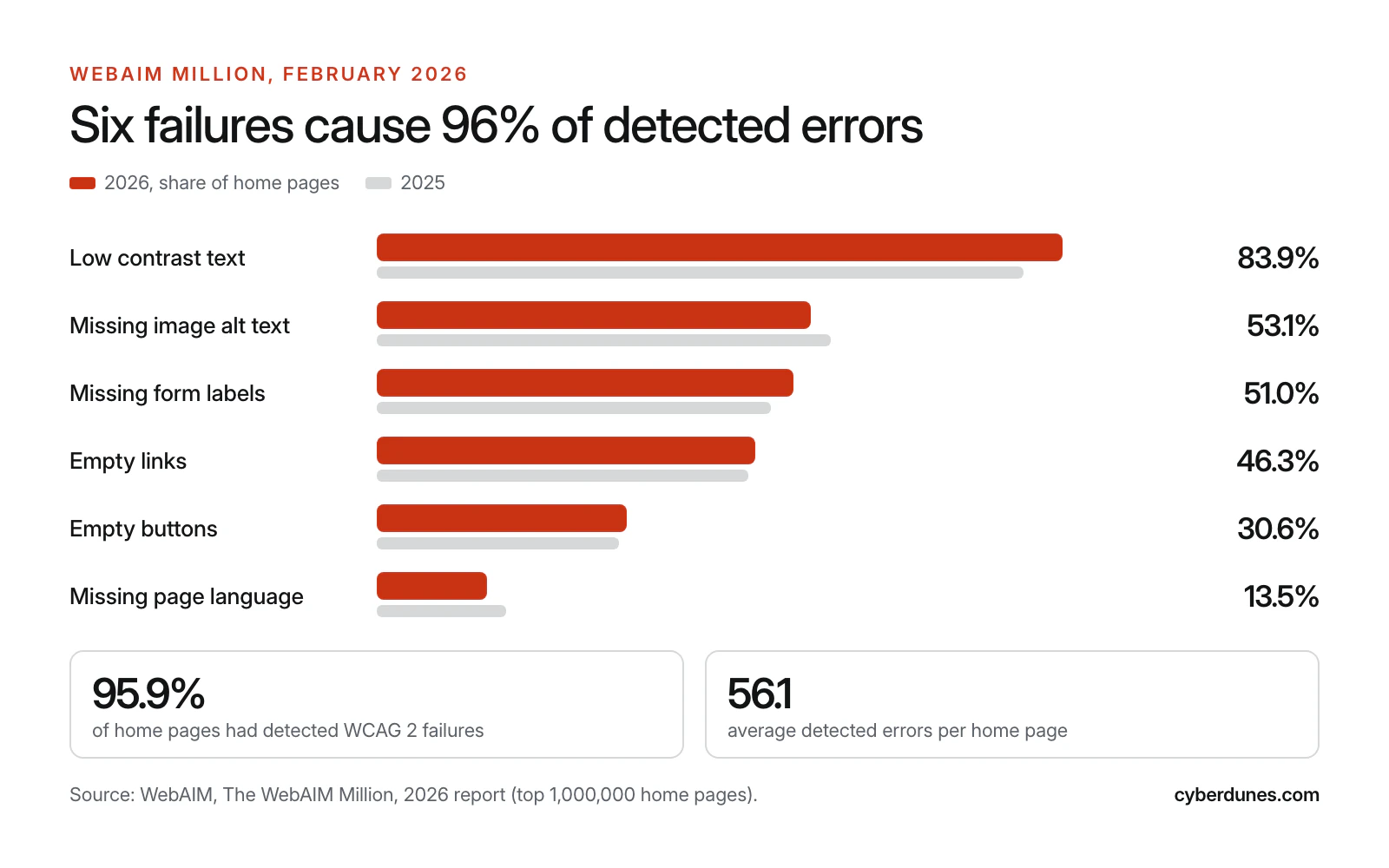
Two findings should shape your plan. First, "96% of all errors detected fall into these six categories," so the first month of work is predictable. Second, home pages that used ARIA averaged 59.1 errors against 42 without it. Custom widgets with ARIA bolted on cause more problems than native HTML. The same native elements make your site easier for AI agents to use, as we explain in our guide to designing for AI agents.
Note that automated tools only catch what a machine can detect. Keyboard traps, confusing focus order, poor error messages and most of the new WCAG 2.2 criteria need a person to test them.
The WCAG 2.2 AA Checklist: Prioritized by Risk
Work the checklist in priority order. P1 items are the most common failures and the ones that block key journeys; P2 items are the new WCAG 2.2 criteria and journey-level issues; P3 items are lower risk but still required for AA. It covers the criteria most sites fail, not every Level A and AA criterion, so finish with a full audit.
| Priority | Success criterion | What usually fails | How to test | Owner | Effort |
|---|---|---|---|---|---|
| P1 | 1.4.3 Contrast (Minimum), AA | Body text below 4.5:1, large text below 3:1; grey placeholder text | Automated scan, then check design tokens with a contrast checker | Design | Low |
| P1 | 1.1.1 Non-text Content, A | Images, icons and logos with no text alternative | Automated scan; make alt text a required CMS field | Content | Low |
| P1 | 1.3.1 Info and Relationships and 3.3.2 Labels or Instructions, A | Form fields with placeholder text but no label | Click each label: focus must move into its field | Developer | Low |
| P1 | 2.4.4 Link Purpose and 4.1.2 Name, Role, Value, A | Empty links and buttons, usually icon-only | Automated scan; screen reader rotor lists of links and buttons | Developer | Low |
| P1 | 3.1.1 Language of Page, A | Missing lang attribute on the html element | View source on every template | Developer | Very low |
| P1 | 2.1.1 Keyboard, A | Menus, sliders, date pickers or checkout steps that need a mouse | Complete each key journey with Tab, Enter, Space and arrows only | Developer | Medium |
| P1 | 2.4.7 Focus Visible, AA | Focus outline removed in CSS | Tab through each template and watch for a visible indicator | Design | Low |
| P1 | 2.4.11 Focus Not Obscured (Minimum), AA (new) | Sticky headers, cookie bars and chat widgets that cover the focused element | Tab through long pages with every overlay open | Developer | Low to medium |
| P1 | 3.3.8 Accessible Authentication (Minimum), AA (new) | Login that blocks paste or password managers, or a puzzle with no alternative | Log in with a password manager and with paste | Product | Medium |
| P2 | 2.5.8 Target Size (Minimum), AA (new) | Tap targets smaller than 24 by 24 CSS pixels without enough spacing | Measure icons, pagination and filter chips in dev tools | Design | Medium |
| P2 | 2.5.7 Dragging Movements, AA (new) | Sliders, carousels, maps and kanban boards that only work by dragging | Try each with single clicks or taps | Developer | Medium |
| P2 | 3.3.7 Redundant Entry, A (new) | Checkout asks for the same address twice | Walk checkout and sign-up; note any repeated field | Product | Low |
| P2 | 3.2.6 Consistent Help, A (new) | Help, phone or chat links move between pages | Compare header and footer order across templates | Design | Low |
| P2 | 3.3.1 Error Identification and 3.3.3 Error Suggestion | Errors shown only in red, or with no hint to fix them | Submit forms empty and with bad data | Design | Medium |
| P2 | 1.4.10 Reflow and 1.4.4 Resize Text, AA | Horizontal scrolling at 320 CSS pixels; clipped text at 200% zoom | Zoom to 400% on a desktop browser | Developer | Medium |
| P2 | 4.1.3 Status Messages, AA | Cart updates, search results counts and toasts not announced | Screen reader test of add to cart and filters | Developer | Medium |
| P3 | 1.4.11 Non-text Contrast, AA | Input borders and icons below 3:1 | Check form and icon tokens | Design | Low |
| P3 | 1.3.5 Identify Input Purpose, AA | Name, email and address fields without autocomplete values | Inspect form inputs | Developer | Low |
| P3 | 1.2.2 Captions (Prerecorded), A | Marketing and product videos without captions | Inventory videos; check caption tracks | Marketing | Medium |
| P3 | 2.2.2 Pause, Stop, Hide, A | Auto-playing carousels or animation longer than five seconds with no pause | Load home and landing pages | Design | Low |
| P3 | 2.4.2 Page Titled and 2.4.6 Headings and Labels | Duplicate page titles; vague headings | Crawl titles; review heading outline | Content | Low |
Owners are suggestions. What matters is that each row has one named person; rows owned by "the team" tend to stay open.
How to Test Without a Large Budget
- Automated scan of every template with a free browser extension or a crawler. Fix everything it reports on shared components first.
- Keyboard-only walkthrough of each key journey: home to product to cart to checkout, or home to form to thank-you page.
- Screen reader pass with NVDA on Windows, VoiceOver on macOS and iOS, and TalkBack on Android for mobile-first Indian audiences.
- Zoom and reflow test at 200% text size and 400% page zoom.
- Usability session with disabled users on your highest-revenue journey. Even three sessions surface issues no checklist catches, and the empathy work in the design thinking process helps you frame them; our piece on unconventional user testing shows how cheap sessions can still be revealing.
A 60-Day WCAG 2.2 AA Remediation Plan
Sixty days is enough to take a typical marketing or ecommerce site from unknown risk to a documented, defensible baseline. Larger estates should run the plan per property or per design system release.
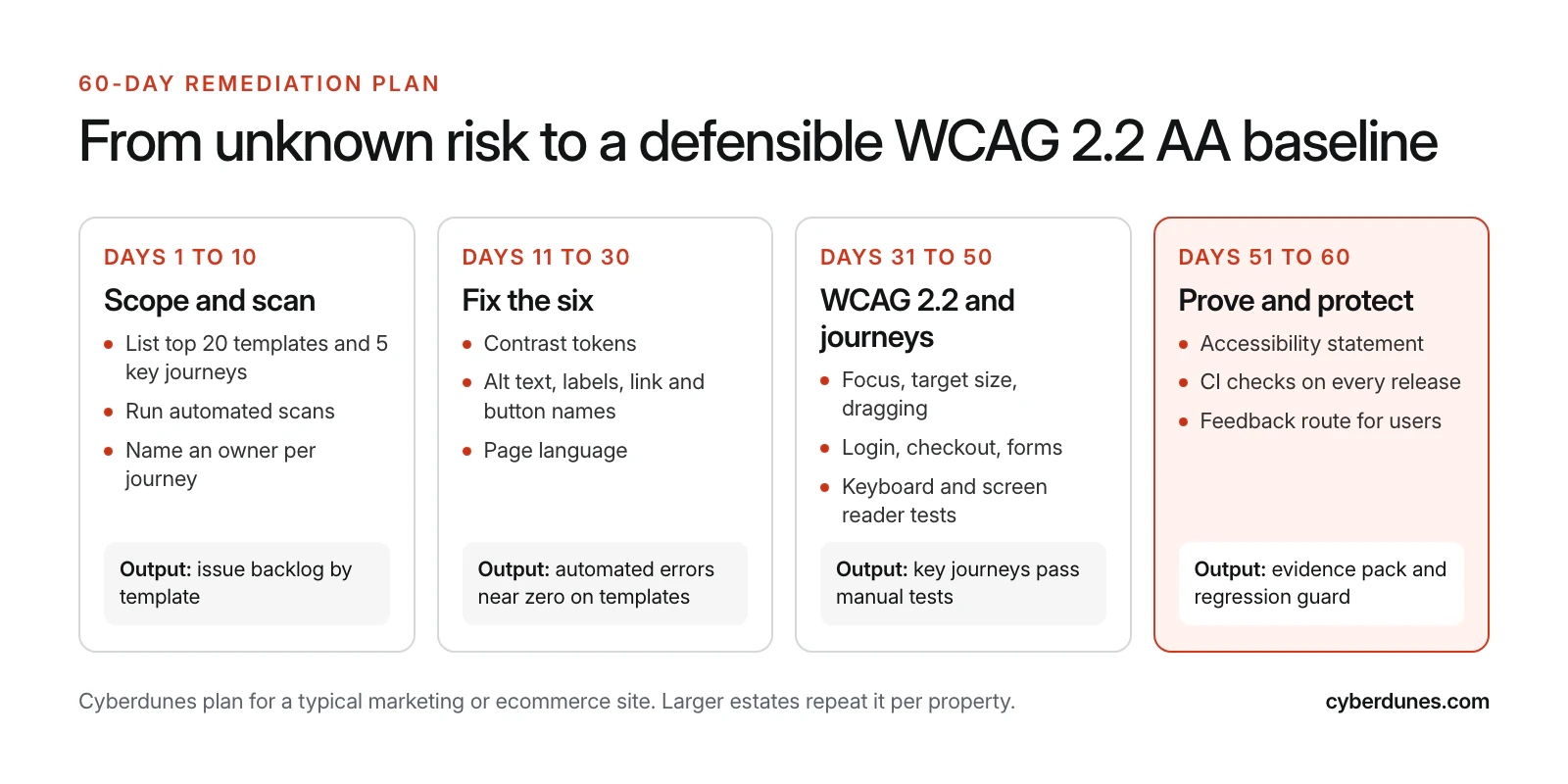
- Days 1 to 10, scope and scan. List your top 20 templates and five key journeys. Run automated scans and a keyboard walkthrough. Log issues by template, not by page, and name an owner for each journey.
- Days 11 to 30, fix the six. Update color tokens to meet 4.5:1 for text and 3:1 for large text and interface components. Make alt text required in the CMS, label every field, name every link and button, and set the page language.
- Days 31 to 50, WCAG 2.2 and journeys. Fix focus visibility and sticky overlays, enlarge small targets, add click alternatives to drag interactions, allow paste and password managers at login, and remove redundant entry from checkout.
- Days 51 to 60, prove and protect. Retest every journey, publish an accessibility statement with a feedback route, and add automated accessibility checks to your release pipeline so regressions fail the build.
Accessibility work overlaps with speed and security work: lighter pages and fewer third-party widgets help all three. Our list of free tools to test website speed pairs well with the accessibility scanners above. Pair this plan with our performance guidance for Apex® sites and the website security checklist.
Plan your WCAG 2.2 remediation with us
Common Accessibility Compliance Mistakes
- Relying on an overlay widget. A script added on top of the page does not change the underlying code that assistive technology and auditors read.
- Testing only the home page. Checkout, login and forms carry the legal and revenue risk.
- Fixing pages instead of components. A button fixed once in the design system is fixed everywhere.
- Treating ARIA as a shortcut. The WebAIM data shows more ARIA tends to mean more errors. Use native HTML first.
- Treating accessibility as cost only. Clear labels, readable contrast and simple checkout help every visitor; see our conversion rate optimization fixes for how the same changes lift conversion.
- No owner after launch. Every new campaign page, video or pop-up can reintroduce failures. Make accessibility part of your definition of done.
- Ignoring third-party widgets. Chat, booking and payment embeds count as part of your site to the user, and to most regulators.
How Cyberdunes and Apex® Help You Meet WCAG 2.2 AA
Our UX and UI design team audits your templates and journeys against the checklist above, fixes the design system tokens and components, and tests with keyboard and screen readers. Our web development services implement the fixes and add automated checks to your release pipeline so they stay fixed.
On Apex®, the AI-native digital experience platform (DXP), the WYSIWYG editor, digital asset management and multilingual publishing give content teams one place to manage alt text, page titles and language versions across sites. Teams that want to build the skills in-house can join our UX/UI Masterclass. We do not promise legal compliance, which depends on your markets and your counsel; we help you build a site that meets the standard and can show its work.
Sources
- What's New in WCAG 2.2 (W3C)
- Web Content Accessibility Guidelines (WCAG) 2.2, W3C Recommendation (W3C, December 2024)
- WCAG 2 Overview (W3C)
- The WebAIM Million, 2026 Report (WebAIM, March 2026)
- The EU Becomes More Accessible for All (European Commission, July 2025)
- European Accessibility Act (European Commission)
- Web Accessibility Laws and Policies: European Union (W3C)
- European Accessibility Act (Wikipedia)
- Exemption Self-Test for Micro-Enterprises Providing Services (Government of Luxembourg)
- Rule on Web and Mobile App Accessibility for State and Local Governments (US Department of Justice, ADA.gov, updated April 2026)
- DOJ Extends ADA Title II Website Accessibility Deadlines (Seyfarth Shaw, April 2026)
- Bridging the Digital Divide: India's Evolving Accessibility Framework (Legal500)
- Supreme Court's Stand on Digital Inclusion (SCC Online, May 2025)