



Skip to content

Marketing

How to Improve Your Email Click-Through Rate in 4 Steps

Your emails get opened but not clicked. Check your numbers against current benchmarks, then use these four steps to raise your click-through rate.

Man in a mustard T-shirt typing on a laptop at a white desk in a bright officeHow to Improve Your Email Click-Through Rate in 4 Steps

High open rates mean little if nobody clicks. Your email click-through rate (CTR), the share of recipients who click a link in your email, depends on what happens after the open: whether the message reaches the inbox, feels relevant, asks for one clear action and arrives at the right moment. Here is how to measure it properly and four steps to improve it.

What Is a Good Email Click-Through Rate?

Benchmarks vary by industry, list and email type, so use them as a rough guide rather than a target. Mailchimp's email marketing benchmarks, last updated in December 2023 and based on campaigns sent to at least 1,000 subscribers, put the average click rate across all users at 2.62% and the average open rate at 35.63%. Mailchimp's table also breaks results down by industry, so compare yourself with your own sector.

Two cautions when reading your own numbers:

  • Open rates are less reliable than they used to be. Mailchimp notes that Apple's Mail Privacy Protection can affect the accuracy of open rates, because some opens are recorded automatically. Clicks are a better signal of real interest.
  • CTR and conversion rate are different. CTR measures clicks. Conversion rate measures how many people completed the action you wanted, such as a purchase or sign-up.
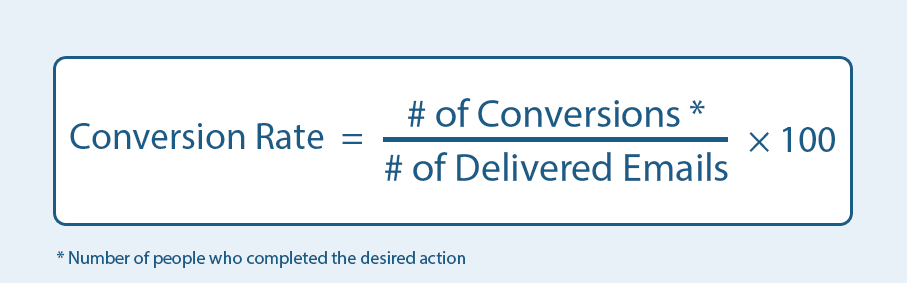
Formula: email conversion rate equals number of conversions divided by number of delivered emails, times 100

Track CTR to judge the email itself, and conversion rate to judge the whole journey, including your landing page.

Before You Start: Make Sure You Reach the Inbox

No one clicks an email that lands in spam. Gmail's email sender guidelines ask senders of more than 5,000 messages a day to authenticate with SPF, DKIM and DMARC, support one-click unsubscribe and keep their reported spam rate below 0.30%. Even if you send less, these are good habits. Clean out inactive subscribers regularly, too.

Step 1: Segment Your Audience

Know your target audience before you write a single email. Your list contains people with different needs, and one generic message will not work for all of them. Divide your list into segments and learn what each one wants.

Useful bases for segments include location, purchase history, browsing behavior, lifecycle stage and stated preferences. Once you know a segment, you know what will make it click. Use images where they support the message, and always include descriptive alt text, since many email apps block images by default.

Step 2: Give Each Email One Clear Call to Action

Give each email one objective. A common mistake is asking readers to do several things at once. Use one primary call to action (CTA), repeated if the email is long, because several competing requests often lead to no clicks at all.

Make the CTA a clear button with specific wording, such as "See the spring menu" rather than "Click here", and make sure it is easy to tap on a phone. Write in plain language your audience connects with.

Step 3: Give Readers a Reason to Click Now

Give readers a reason to act: an offer, a piece of content or a piece of news that matches the segment you are emailing. This is why segmentation comes first. Put yourself in your reader's position and ask what would make them click today rather than later. The page they land on should deliver exactly what the email promised, or your conversion rate will suffer even if your CTR is strong.

Step 4: Send at the Right Time and Test

Send emails when your audience is most likely to read them. The right email at the wrong time gets buried under newer messages. Check when your subscribers usually engage, and use your email tool's send-time features if it has them.

Then test. Change one thing at a time, such as the subject line, CTA wording or send time, and compare results. Our guide to A/B testing explains how to run fair tests.

Recap

Get into the inbox, segment your audience, keep one objective per email, make an offer that fits the reader, and send at the right time. Review your clicks after every campaign and adjust. If you are choosing a platform, see our comparison of email marketing tools for small businesses.


FAQs

Questions, Answered

Can’t find what you’re looking for? Our team is happy to help.

What is email click-through rate?

Email click-through rate (CTR) is the share of recipients who click a link in an email. It reflects what happens after the open: whether the message reached the inbox, felt relevant, asked for one clear action and arrived at the right moment. Clicks are a stronger signal of real interest than opens.

What is a good email click-through rate?

Benchmarks vary by industry, list and email type, so treat them as a rough guide. Mailchimp's email marketing benchmarks, last updated in December 2023 and based on campaigns sent to at least 1,000 subscribers, put the average click rate at 2.62% and the average open rate at 35.63%. Compare yourself with your own sector.

What is the difference between email CTR and conversion rate?

Email CTR measures how many recipients clicked a link, while conversion rate measures how many completed the desired action, such as a purchase or sign-up. Email conversion rate is the number of conversions divided by the number of delivered emails, times 100. Use CTR to judge the email and conversion rate to judge the whole journey.

Why are email open rates less reliable now?

Open rates are less reliable because Apple's Mail Privacy Protection can record some opens automatically, which inflates the numbers. Mailchimp notes that this affects open rate accuracy. Clicks are a better measure of genuine engagement, so many marketers focus on CTR when judging campaign performance.

How do I make sure my emails reach the inbox?

Authenticate your sending domain with SPF, DKIM and DMARC, support one-click unsubscribe and keep your spam rate low. Gmail's sender guidelines require these for senders of more than 5,000 messages a day and ask them to keep the reported spam rate below 0.30%. Regularly removing inactive subscribers also helps deliverability.

How does segmentation improve email clicks?

Segmentation improves clicks because one generic message rarely suits everyone on a list. Dividing subscribers by location, purchase history, browsing behavior, lifecycle stage or stated preferences lets you send content each group actually wants. When the message matches the reader's needs, they are far more likely to click.

How many calls to action should an email have?

An email should have one primary call to action (CTA), repeated if the email is long. Asking readers to do several things at once often leads to no clicks at all. Make the CTA a clear button with specific wording, such as "See the spring menu" rather than "Click here", and easy to tap on a phone.

How do I give readers a reason to click now?

Give readers an offer, a piece of content or news that matches the segment you are emailing, and ask what would make them click today rather than later. Then make sure the landing page delivers exactly what the email promised, otherwise conversions will suffer even if click-through rate is strong.

When is the best time to send marketing emails?

The best time is when your own audience is most likely to read, which differs from list to list. Check when your subscribers usually engage and use your email tool's send-time features if it has them. The right email sent at the wrong time can get buried under newer messages.

How should I A/B test my emails?

Change one thing at a time, such as the subject line, CTA wording or send time, and compare results between versions. Testing one variable at a time shows what actually caused the difference. Review clicks after every campaign and apply what you learn to the next send.

Should emails include images?

Emails can include images where they support the message, but always add descriptive alt text. Many email apps block images by default, so the email and its call to action should still make sense without them. A clear text CTA button keeps the email clickable even when images do not load.

Put It Into Practice

Want Help Putting These Ideas to Work in Your Business?