




A/B testing, also called split testing, compares two or more versions of a web page to see which design, content or feature performs better. Instead of guessing what visitors want, you show each version to a share of your traffic and measure the results. Here is how A/B testing for websites works, how it improves conversions and how to run tests you can trust.
How A/B Testing Works
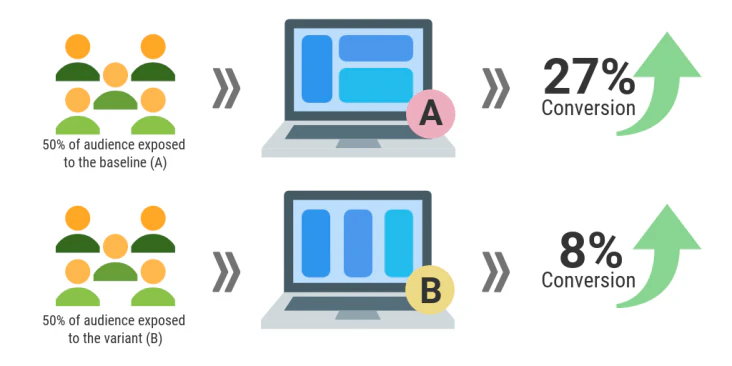
You split visitors at random into groups. One group sees the current page (the control, or version A). Another sees a changed version (the variant, or version B). After enough visitors have taken part, you compare a single main metric, such as purchases, sign-ups or form submissions, and keep the version that wins.
Why Small Changes Can Matter
Testing often reveals that ideas nobody prioritized have the biggest effect. In Harvard Business Review, Ron Kohavi and Stefan Thomke described a Microsoft Bing test in which a simple change to how ad headlines were displayed, one of hundreds of ideas proposed, increased revenue by 12% without hurting user experience measures. Without a test, nobody would have known.
The same article makes the opposite point too: many ideas that seem obviously good make no difference, or make things worse. Testing protects you from shipping those.
What A/B Testing Improves
Conversion Rates
The main goal of most tests is a higher conversion rate: the percentage of visitors who complete a desired action, such as buying, subscribing or filling out a form. Test headlines, calls to action (CTAs), forms, page layouts and offers.
User Experience
Testing lets you base user experience (UX) decisions on evidence. Try variations of navigation, layout and content order to find what helps visitors get where they want to go. Our UX and UI design team often pairs research with testing for exactly this reason.
Content and Messaging
Test headlines, copy and images to find the messages that drive engagement. Testing also works well as part of your lead generation strategy, for example on landing pages and sign-up forms.
Personalization
Create versions of a page for different audiences, such as new and returning visitors, and test which delivers the more relevant experience.
Mobile Experience
Most web traffic is now mobile. StatCounter puts mobile at 58.99% of worldwide web traffic in September 2026, against 39.26% for desktop. Test your mobile pages separately, since what works on a large screen often fails on a small one.
How to Run an A/B Test You Can Trust
- Start with a hypothesis. For example: "Showing delivery times on the product page will increase add-to-cart rate, because shoppers worry about delivery."
- Pick one primary metric before the test starts, and don't change it halfway through.
- Change one thing at a time so you know what caused the result.
- Run the test long enough. Decide the sample size in advance and run for at least a full business cycle, usually one to two weeks, so weekday and weekend behavior are both included.
- Don't stop early because a result looks good on day two. Early leads often disappear.
- Record and share what you learn, including tests that lose. They stop the team repeating the same idea.
Choosing an A/B Testing Tool
If you used Google Optimize, note that Google sunset Optimize and Optimize 360 on September 30, 2023. Teams now use dedicated experimentation tools, many of which integrate with Google Analytics 4, or testing features built into their website platform. Choose a tool that fits your traffic, your team's skills and how easily you can publish the winning version.
Benefits of A/B Testing for Websites
- Better conversion rates: each winning test lifts the share of visitors who act.
- More revenue: higher conversion on the same traffic means more sales without more ad spend.
- Better user experience: you keep the changes visitors actually find easier.
- Evidence over opinion: decisions rest on results, not on the loudest voice in the room.
- Continuous improvement: small, repeated wins add up over time.
To act on what your tests show, you need a platform that makes changes easy. Apex® brings publishing, personalization and analytics into one place, so you can update a page and see how the change performs.