
AI agents for marketing are software systems that take a goal, plan the steps and use your tools (analytics, CMS, CRM, ad platforms) to complete marketing work with limited human input. The useful question for 2027 is not whether to use them, but which workflows to hand over first, with what permissions and under whose sign-off.
Key Takeaways
- Budgets are ahead of readiness. Chief marketing officers (CMOs) put 15.3% of marketing budgets into AI in 2026, yet only 30% say their AI capabilities are mature (Gartner).
- Score every candidate workflow on four factors: volume, reversibility, data access and brand risk. Start with high-volume work that is easy to undo and never touches customers directly.
- Climb an autonomy ladder: shadow, then draft and approve, then act within hard limits. Each step needs evidence from evals, not enthusiasm.
- Enforce permissions in your systems, not in prompts. Give each agent its own narrow access, log every action and keep a kill switch.
- Measure ROI as hours saved and cycle time, net of run and review costs, against a baseline you record before the pilot.
This guide is for CMOs, marketing operations leads and founders who have run a few AI pilots and now need an operating model. At Cyberdunes we build Apex®, an AI-native digital experience platform (DXP) with Model Context Protocol (MCP) support, and we teach AI product practice in our Masterclass, so we see both the tooling and the team side of agent rollouts. The scoring model and plan below are how we would run it.
What Are AI Agents for Marketing, and How Are They Different From AI Tools?
An AI agent acts; an AI tool answers. A writing assistant drafts a post when you ask. An agent takes an objective such as "publish this week's performance summary", decides the steps, pulls the data, drafts the report and files it, calling tools along the way.
That difference changes the risk. A bad draft costs a few minutes of editing. A bad action can send an email to the wrong segment, overspend a campaign or overwrite a live page. So the operating model has to answer three questions before any technology choice:
- Scope: which workflows an agent may run.
- Authority: what it may read, draft or change, and where a human signs off.
- Evidence: how you know it works before and after it goes live.
Be careful with labels too. Gartner warns of "agent washing", the rebranding of assistants, robotic process automation (RPA) and chatbots without real agentic capability, and estimates that only about 130 of the thousands of agentic AI vendors are real (Gartner, June 2025). Ask any vendor which actions the agent takes on its own, and which systems it can change.
Where Are Marketing Teams With AI Agents in 2026?
Most teams use AI widely but run few agents end to end. Spending is ahead of operating maturity, which is exactly why an operating model matters now.
- CMOs allocate an average of 15.3% of marketing budgets to AI, but only 30% say their organizations have mature or fully developed AI capabilities. Mature organizations allocate 21.3% (Gartner's 2026 CMO Spend Survey of 401 marketing leaders, as reported by MarTech, May 2026).
- AI is used in 24.2% of marketing activities in 2026, up from 13.1% in 2024, and companies expect 55.9% within three years. Yet only 9.6% report using "autonomous objects or systems" (The CMO Survey, spring 2026).
- In BCG's 2026 survey of 300 CMOs, 96% said AI is driving end-to-end transformation of their function, but only 8% run campaigns in which multiple agents operate autonomously (BCG, June 2026).
- Among 46 of the world's largest brand owners, 75% require human oversight of AI-generated outputs and 70% keep approved or prohibited tool lists (WFA, September 2026).
The warning sign is the cancellation rate. Gartner predicts that over 40% of agentic AI projects will be canceled by the end of 2027, "due to escalating costs, unclear business value or inadequate risk controls" (Gartner). Every one of those three causes is an operating model problem, not a model problem.
Which Marketing Workflows Should You Hand to Agents First?
Start with work that is frequent, easy to undo, needs only low-sensitivity data and never speaks to customers on its own. Score each candidate on four factors from 1 to 5, where 5 is best suited to an agent.
| Factor | Score 5 when | Score 1 when |
|---|---|---|
| Volume | It runs daily or weekly and eats many hours | It happens a few times a year |
| Reversibility | A wrong output can be undone in minutes with no trace | It cannot be recalled once done (a send, a payment, a public statement) |
| Data access | It needs only aggregated or public data | It needs personal, financial or contract data |
| Brand risk | Output stays internal or is reviewed before anyone sees it | Customers, press or regulators see it directly |
Add the four scores. At 16 or more, pilot with an agent. From 11 to 15, start in approval mode. At 10 or below, wait. One override: a score of 1 on reversibility or brand risk means a human signs off, whatever the total.
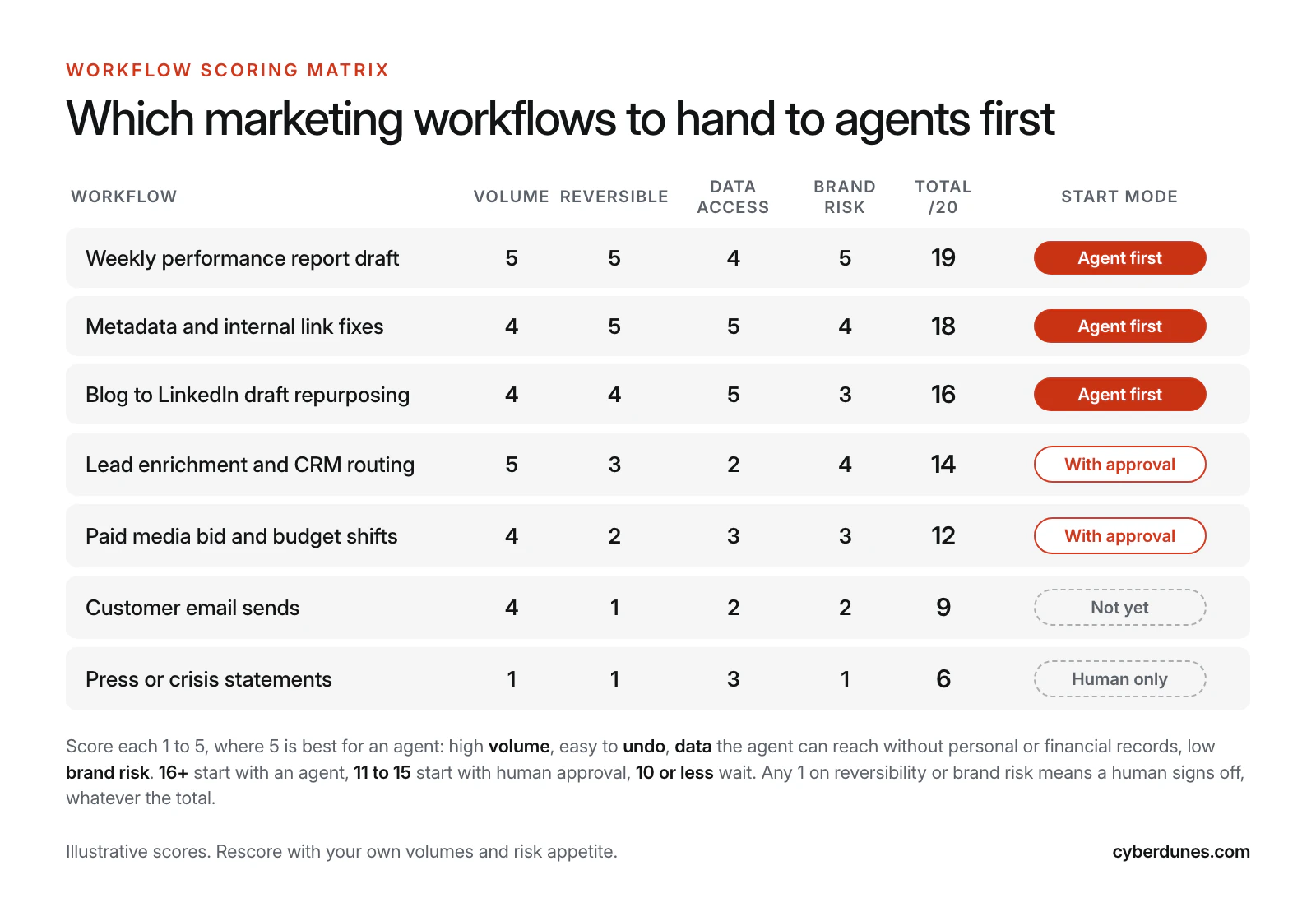
In our scoring, three workflows usually come out on top: drafting weekly performance reports, fixing metadata and internal links, and repurposing long articles into social drafts. They repeat every week, sit behind a review step and touch no personal data. Content repurposing also feeds your generative engine optimization (GEO) program, as long as a person checks facts before anything publishes. Lead routing and media pacing come next, with approval. Customer email sends and crisis communications wait.
If you are unsure what your stack can expose to an agent, run a martech stack audit first. Agents inherit the mess in your data and integrations, so it pays to know which systems are the source of truth.
Where Should Humans Stay in the Loop?
Humans should approve anything irreversible or public, and sample everything else. The practical way to get there is an autonomy ladder that each workflow climbs one step at a time.
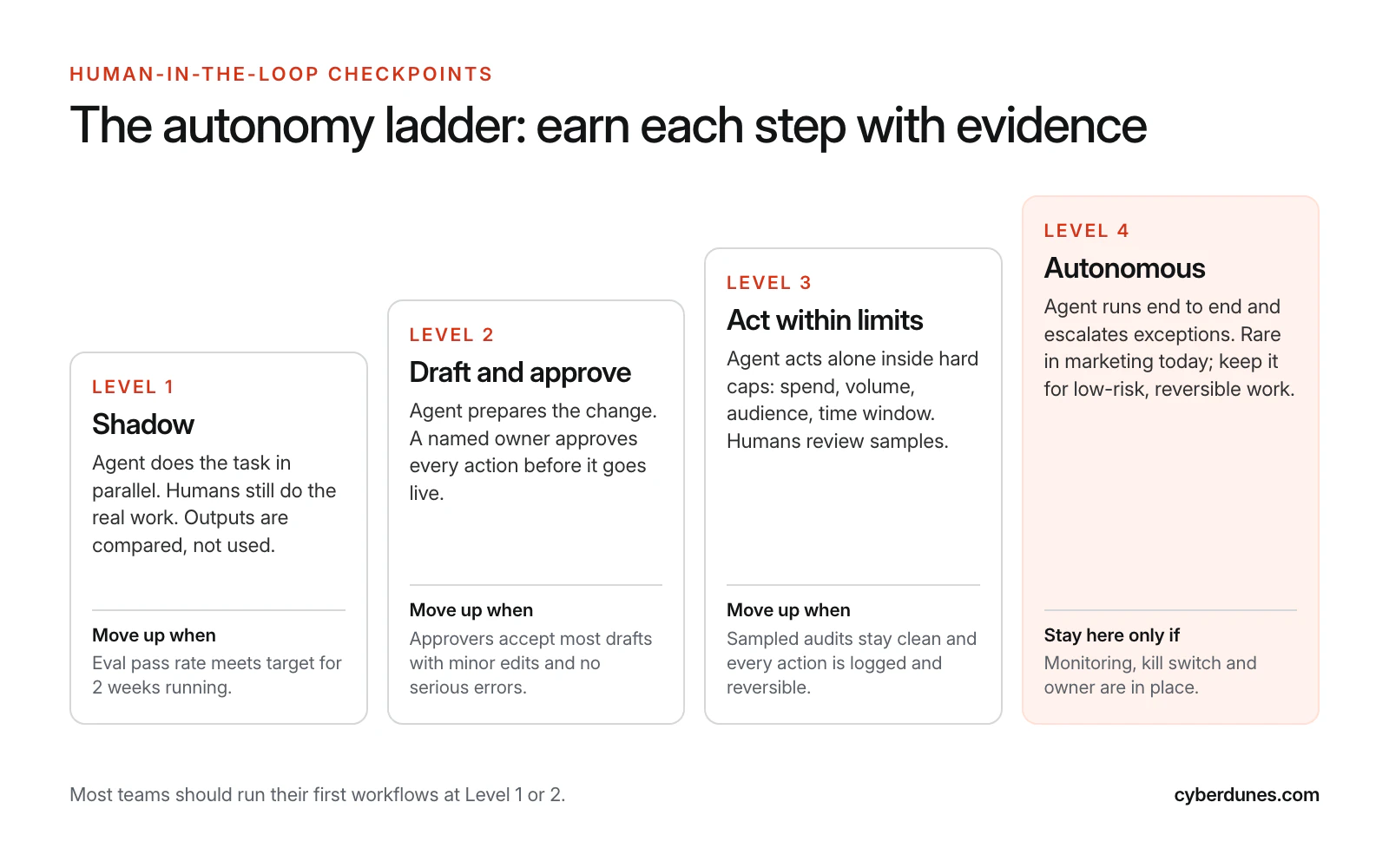
- Shadow. The agent runs in parallel while people do the real work. You compare outputs.
- Draft and approve. The agent prepares the action and a named owner approves each one.
- Act within limits. The agent acts alone inside hard caps on spend, volume, audience and time window. Humans audit a sample each week.
- Autonomous. End to end, with escalation for exceptions. Keep this for low-risk, reversible work.
The protocol world agrees with this default. The MCP specification says that for trust and safety "there SHOULD always be a human in the loop with the ability to deny tool invocations", and that clients should prompt for confirmation on sensitive operations (Model Context Protocol specification).
Write down the checkpoints in an agent charter: the goal, the tools, the permissions, the human owner, the stop conditions ("pause if cost per lead rises 30% in a day") and the escalation path. If no one will put their name on the charter, the workflow is not ready.
How Do You Govern Agent Permissions?
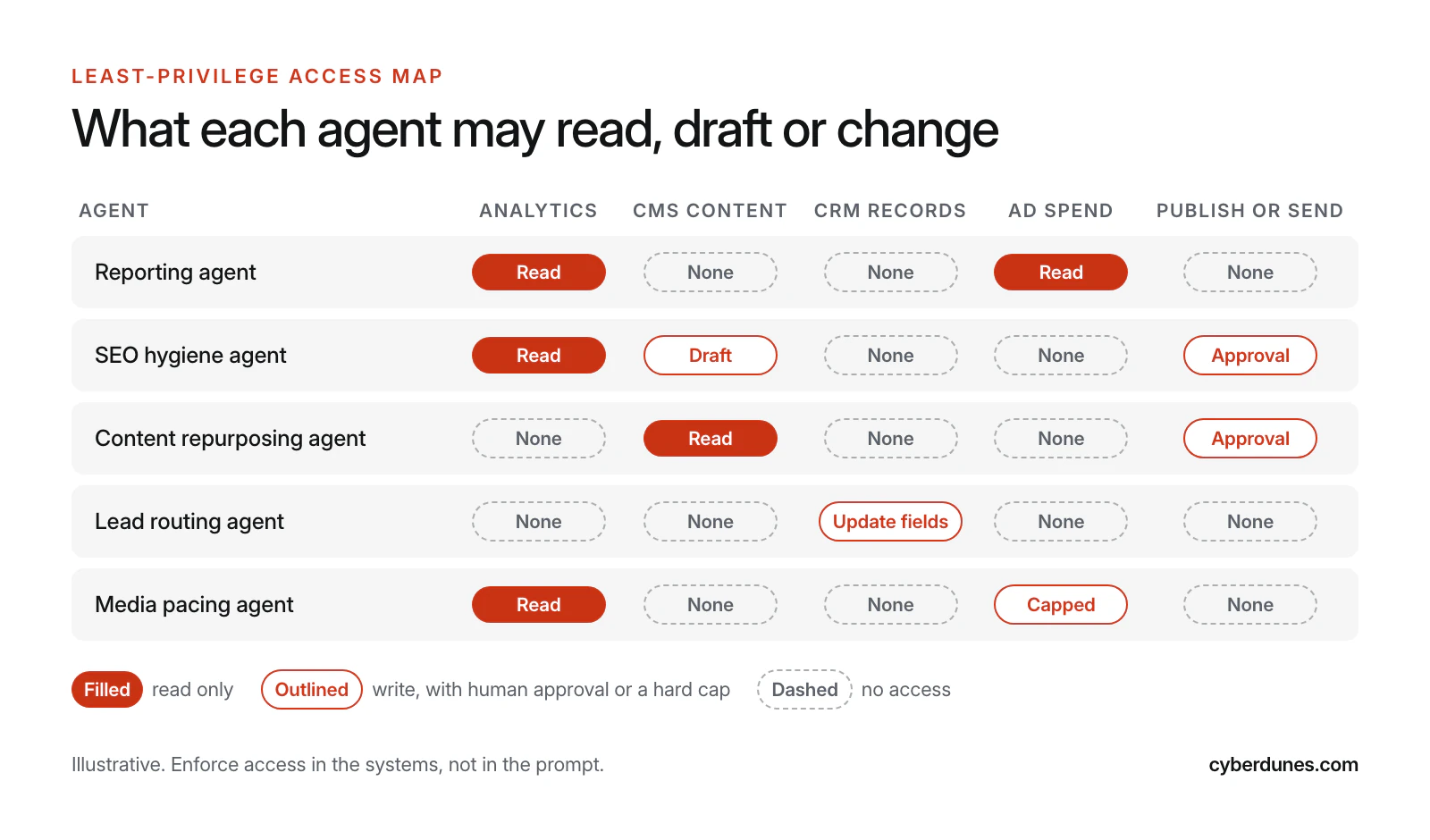
Give each agent the narrowest access that lets it do one job, and enforce that access in the systems themselves. A prompt that says "never publish" is not a control.
The OWASP GenAI Security Project names this risk "Excessive Agency" and traces it to three causes: excessive functionality, excessive permissions and excessive autonomy. Its mitigations read like a marketing ops checklist: limit the tools an agent can call, limit what each tool can do, require human approval for high-impact actions, and "implement authorization in downstream systems rather than relying on an LLM [large language model] to decide if an action is allowed" (Owasp). OWASP has since published a dedicated Top 10 for Agentic Applications, dated December 2025 (Owasp).
MCP-Style Access
The Model Context Protocol (MCP) is the open standard many assistants now use to connect to tools and data. It helps governance because access is defined once, per server, instead of inside every custom script. For remote servers, the MCP authorization specification builds on OAuth 2.1 and tells clients to follow "the principle of least privilege by requesting only the scopes necessary for their intended operations" (MCP authorization specification). Servers must validate inputs, implement access controls and rate-limit tool calls, and clients should log tool usage for audit (Mcp).
In practice that means:
- One identity per agent, so logs show which agent did what.
- Read-only scopes by default; write scopes added per workflow, with expiry.
- Separate staging and production access. Agents draft in staging.
- Spend and volume caps set in the ad platform or email tool, not only in the agent.
- A quarterly access review that removes anything unused.
Our guide to MCP for marketing teams covers the setup in more depth. If an agent will process customer personal data, involve your privacy lead early; Indian teams should plan around the DPDP consent manager timeline.
How Do You Test an Agent Before It Goes Live?
Build an evaluation set from your own past work and require the agent to pass it before each step up the ladder. Evals turn "it seemed fine in the demo" into a pass rate you can track.
- Collect 50 to 100 real cases from the last quarter: last month's reports, past metadata fixes, old campaign briefs. Include awkward ones.
- Write a pass rule per case. Numbers match the source system. Brand terms are spelled correctly. No claim appears that the source does not support.
- Add must-refuse cases. Requests to email a full list, change a budget above the cap, or follow instructions hidden in a web page or document the agent reads. The pass bar here is 100%.
- Set thresholds before you run. For example, 95% on factual accuracy and an average of 4 out of 5 on a brand voice rubric.
- Rerun after every change to prompts, tools or the underlying model.
Hidden instructions deserve special attention. An agent that reads web pages, reviews or emails can be steered by text planted in them, which is why OWASP recommends human approval for high-impact actions and authorization outside the model. Our no-code playbook on how to build AI evals walks through rubrics and graders step by step.
How Do You Measure ROI From Marketing Agents?
Measure hours saved, cycle time and quality against a baseline recorded before the pilot, then subtract what it costs to run and review the agent. If you skip the baseline, you cannot prove anything.
A worked example, with illustrative numbers. A team spends 6 analyst hours a week per market building performance reports across 4 markets: 24 hours a week. With an agent drafting and a person reviewing for 1 hour per market, the work drops to 4 hours.
| Line | Calculation | Result |
|---|---|---|
| Hours saved per week | 24 − 4 | 20 hours |
| Hours saved per year | 20 × 48 working weeks | 960 hours |
| Value at a blended ₹1,500 per hour | 960 × ₹1,500 | ₹14.4 lakh |
| Run, license and eval upkeep (estimate) | Your actual costs | −₹4 lakh |
| Net annual value | ₹10.4 lakh |
Then check quality. Track the error rate in reports before and after, and the share of agent drafts that approvers accept with only minor edits. A faster report with more errors is not a saving. For revenue-facing workflows such as lead routing, add a business metric (speed to lead, conversion to meeting) and test it properly, ideally with a holdout, the same discipline as A/B testing a website.
A 90-Day Plan to Deploy AI Agents in a Marketing Team
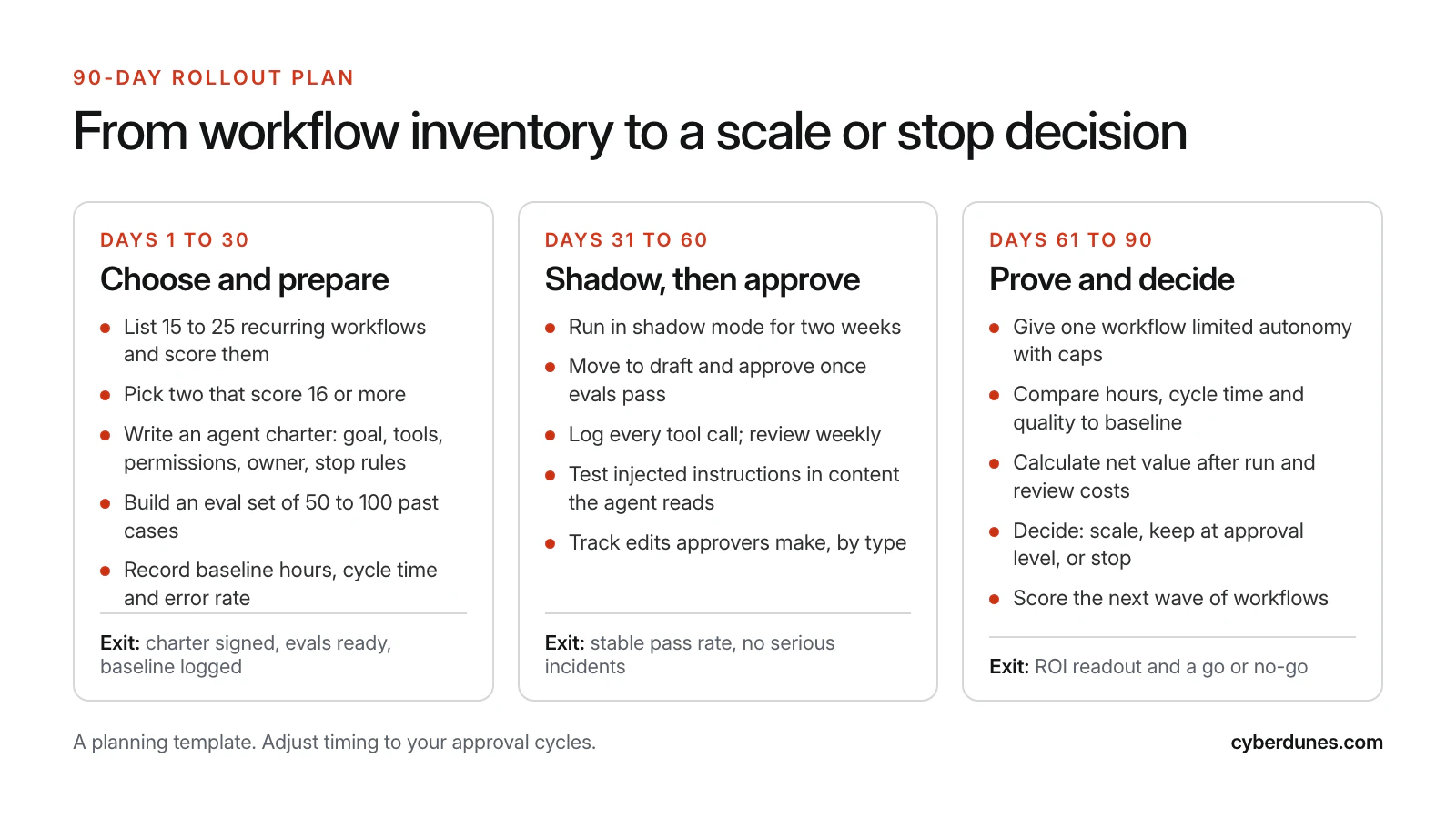
Ninety days is enough to take two workflows from inventory to a scale or stop decision. The plan below assumes one marketing ops owner, one analyst and part-time help from IT or your platform partner.
| Phase | Key actions | Owner | Exit criteria |
|---|---|---|---|
| Days 1 to 30 | Inventory 15 to 25 workflows, score them, pick two at 16+; write charters; build eval sets; record baseline hours, cycle time and errors | Marketing ops lead | Charters signed, evals ready, baseline logged |
| Days 31 to 60 | Two weeks in shadow mode; move to draft and approve once evals pass; log every tool call; test hidden-instruction cases; track approver edits | Workflow owners | Stable pass rate, no serious incidents |
| Days 61 to 90 | Give one workflow capped autonomy; compare to baseline; calculate net value; decide to scale, hold or stop; score the next wave | CMO with finance | ROI readout and a go or no-go |
Treat this like a product launch. Agents need a backlog, owners and a roadmap, the same disciplines covered in our post on how AI is changing the product management lifecycle. That is also why we push marketing leaders to think like product managers; our post on prioritizing AI features that pay back applies the same logic to product teams.
What Goes Wrong With Marketing Agents?
Most failures come from scope, access and measurement, not from the model. These are the ones to plan for.
| Failure mode | What it looks like | Prevention |
|---|---|---|
| Permission creep | An agent granted write access "temporarily" keeps it | Scopes with expiry; quarterly access review |
| Hidden instructions | Text in a page or email steers the agent to leak data or act | Must-refuse evals; approval for high-impact actions; authorization outside the model |
| Silent drift | Quality drops after a model or prompt update | Rerun evals on every change; weekly sampled audits |
| Happy-path testing | Evals use only clean, typical cases | Include edge cases and failures from real history |
| Cost runaway | Loops or retries multiply usage costs | Usage caps and alerts per agent |
| No owner | Nobody fixes or pauses the agent when it misbehaves | A named owner in the charter, with a kill switch |
| Brand voice drift | Drafts slowly lose the house style | Voice rubric in evals; approvers log edit types |
| Agent washing | An "agent" product turns out to be a chatbot with a new label | Ask which actions it takes alone and in which systems |
One more risk sits outside your stack: AI assistants describing your brand wrongly to buyers. Agents that publish at speed can make that worse if they repeat outdated facts. Our companion guide on fixing AI hallucinations about your brand covers the audit and the fixes.
How Cyberdunes and Apex® Help
Apex® supports MCP, so AI assistants and agents can work with your Apex® content through a standard interface instead of a custom integration, with access enabled per account and reviewed by a named owner (see connecting AI assistants with MCP). Apex® Context Intelligence handles several of the high-scoring workflows above inside one workspace: site audits, topic research, answer-first drafts, LinkedIn and short-video repurposing, and scheduled publishing that your team approves. It also tracks AI visibility across ChatGPT, Gemini, Claude, Perplexity and Google AI Overviews; our guide to the AI visibility checker explains what those numbers mean.
For the team side, our AI Product Management Masterclass trains managers to scope, evaluate and govern AI features, which is the same skill set an agent rollout needs.
Talk to Us About an Agent Pilot
Sources
- CMOs Are Buying AI That Their Organization Isn't Ready For, MarTech, reporting Gartner's 2026 CMO Spend Survey, May 2026
- The CMO Survey: Highlights and Insights Report 2026, The CMO Survey, spring 2026
- Moving the Agentic Marketing Transformation from Illusion to Reality, Boston Consulting Group, June 2026
- 96% of Major Brands Now Use AI in Marketing, WFA Research Finds, World Federation of Advertisers, September 2026
- Gartner Predicts Over 40% of Agentic AI Projects Will Be Canceled by End of 2027, Gartner, June 2025
- LLM06:2025 Excessive Agency, OWASP GenAI Security Project, 2025
- OWASP Top 10 for Agentic Applications for 2026, OWASP GenAI Security Project, December 2025
- Model Context Protocol Specification: Tools, Model Context Protocol, June 2025 revision
- Model Context Protocol Specification: Authorization, Model Context Protocol, November 2025 revision